
You know the feeling. A new enquiry lands, you reply quickly, the quote goes out, and then the client disappears into silence while you chase them by email, text, and voicemail. For UK service businesses, that isn't usually a marketing problem, it's a conversion problem, and it often starts long before someone reaches the payment stage.
If you want to improve conversions, you need to stop treating the journey as a single website moment. A cleaner path from enquiry to quote, booking, invoice, and payment usually does more than a prettier homepage ever will. For context on the broader growth picture, it can help to find a CRO agency for growth if you need outside support, but most service businesses can fix the biggest leaks with a tighter process first.
Table of Contents
- Why Conversions Matter for UK Service Businesses
- Auditing Your Conversion Funnels
- Reducing Friction on Public Pages
- Improving CTAs and User Experience
- Optimising Payments and Follow-Ups
- Using Analytics and A/B Testing
- Implementation Checklist and Next Steps
Why Conversions Matter for UK Service Businesses
A plumber can win the lead, send a quote, and still lose the job because the client had to dig through emails to find the approval link. A consultant can get a booking request, then lose the slot because the form felt too long or the next step wasn't obvious. These are not edge cases, they're the normal failure points in a fragmented funnel.
The scale matters because online activity already sits at the centre of UK commerce. The UK had £127.41 billion in online retail sales in 2023, which accounted for 26.6% of all retail sales, according to the Office for National Statistics data referenced in this conversion guide. Service businesses aren't online stores, but the same expectation for speed and clarity now shapes how people enquire, approve, book, and pay.
Why the bottleneck is usually after the click
The issue is that many businesses optimise for getting attention, then ignore what happens next. A clear advert or strong recommendation can bring someone in, but the sale only completes when the quote is understood, the booking is easy, and the invoice is paid without friction.
Practical rule: If a prospect has to think too hard at any step, you've created a conversion leak.
That's why conversion work for service businesses should focus on the full journey, not just the homepage. Once a lead is inside your process, every extra back-and-forth creates another chance for them to delay, compare, or drop out.
Operationally, better systems matter. If your enquiry handling, quoting, scheduling, and invoicing all live in separate tools, you're making it harder to spot where people disappear. That's why many owners eventually look at their wider go-to-market setup, not just a single page, and why a tighter process usually outperforms cosmetic changes to design. For a useful strategy lens, see AetherCloud's go-to-market thinking.
Auditing Your Conversion Funnels
Start with three funnels, not one. For most UK service businesses, the money-making paths are appointment booking, quote approval, and invoice payment. Each has its own failure points, and each needs to be mapped separately if you want to know where the drop-off really happens.
Traffic sources, lead magnets, follow-up sequence, and drop-off analysis
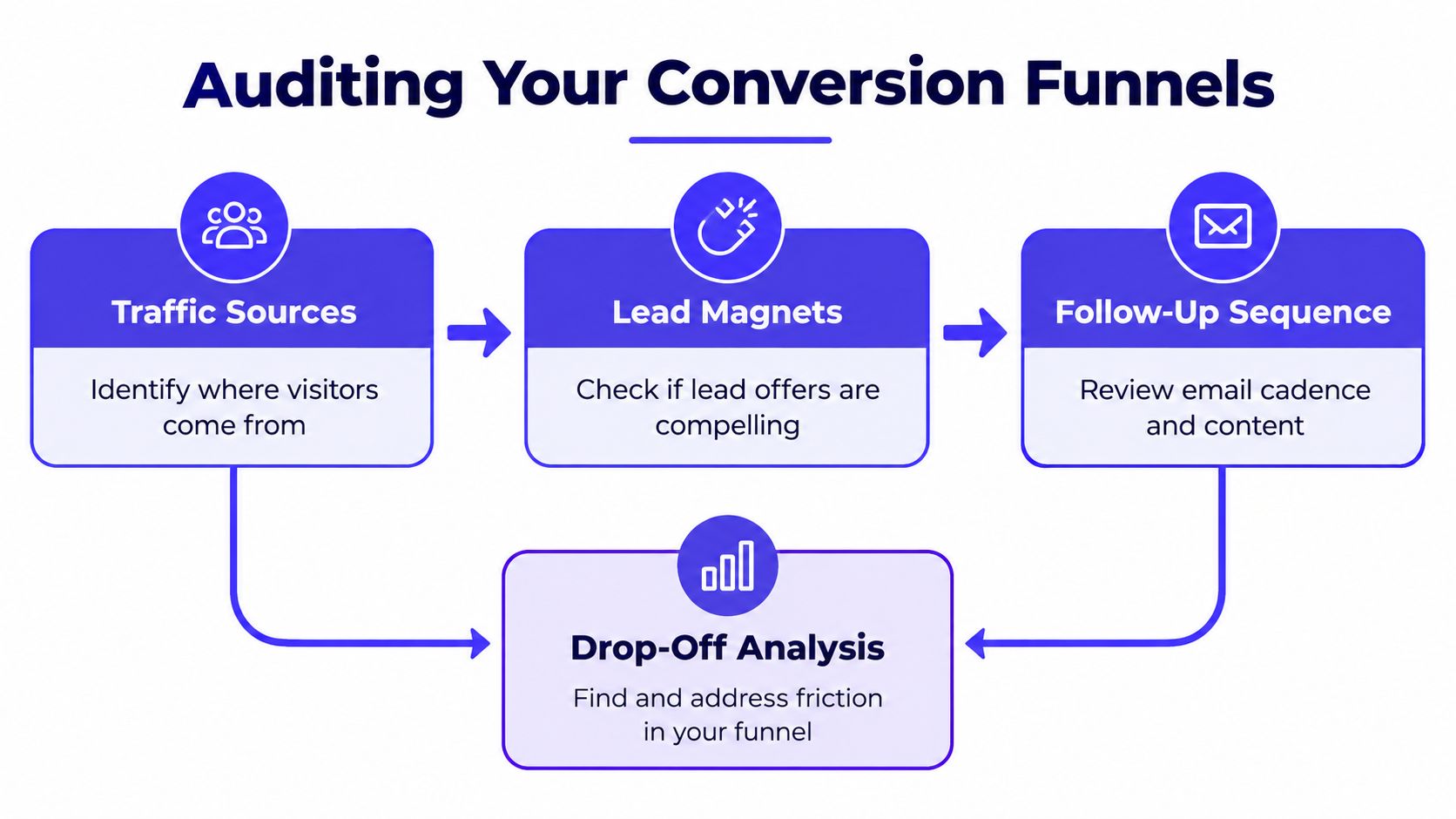
Begin by writing down the exact path from first contact to final payment. For a booking funnel, that might be website visit, booking page, calendar selection, confirmation email, and attendance. For a quote funnel, it might be enquiry form, quote sent, client review, approval, and invoice issue.
Next, identify where people hesitate. Are they starting the form but not finishing it? Are they approving the quote but not booking the visit? Are they clicking the invoice but stopping before payment? Those are different leaks, and they need different fixes.
A simple audit can be done with basic analytics and a spreadsheet. Track the number of people who reach each stage, then compare the steps where there's a sudden drop. If the enquiry form gets submissions but the quote page is ignored, your problem isn't traffic, it's post-enquiry conversion.
Keep the audit boring and consistent. If you change the labels, the sequence, and the form fields at the same time, you won't know what caused the movement.
Use the findings to prioritise action. The highest-friction step usually gives you the fastest uplift because you're improving a process that already has intent behind it. That's why the sales cycle perspective in AetherCloud's cycle of sales article is useful here, the biggest gains often come from tightening the handoff between stages, not from adding more lead sources.
What to record in the audit
- Stage name, so you can compare one funnel with another.
- Drop-off point, so you know exactly where people leave.
- Likely cause, such as form length, unclear next step, or manual follow-up delay.
- Fix to test, so the audit turns into action rather than analysis for its own sake.
The goal is clarity. Once you can see the leak, you can test a fix. Without that visibility, you're only guessing.
Reducing Friction on Public Pages
The fastest gains usually come from removing things, not adding them. Baymard Institute research on checkout usability shows the average cart abandonment rate is 70.19%, and it consistently points to avoidable friction such as unexpected costs, long forms, and complicated flows as major causes, which is why the same logic applies to quote approvals and booking pages in service businesses. Baymard's benchmark findings make one thing clear, people leave when effort rises faster than confidence.
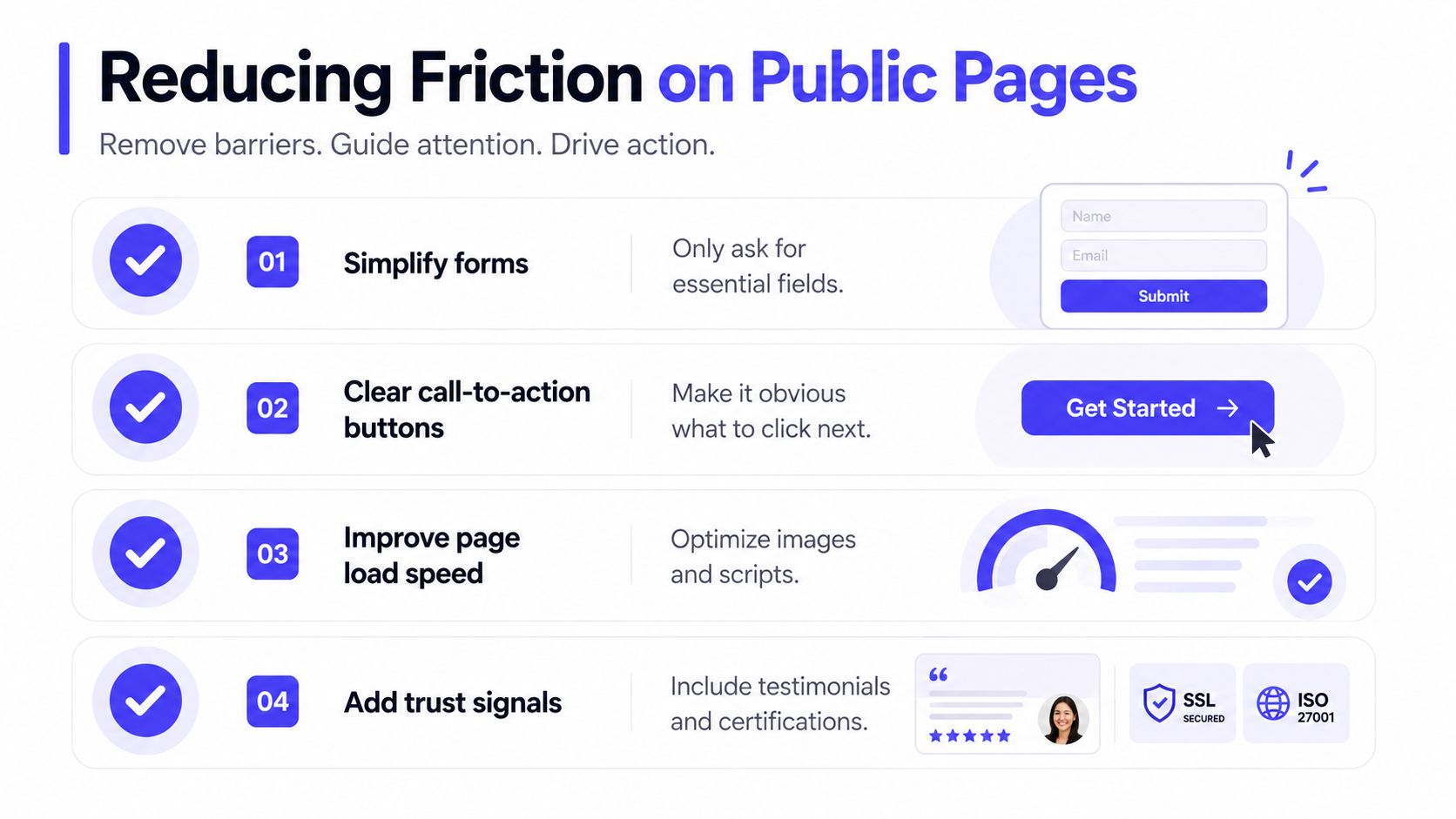
Cut every field you don't need
A quote form should ask only for information needed to respond. If you can answer the enquiry without a company size field, don't include it. If a booking page works with name, email, service type, and preferred time, that's enough to start.
That approach is especially useful for trades, where people want speed, and for consultants, where the first decision is usually whether they trust you enough to continue. Every extra question introduces another moment where they pause and reconsider.
Make the next step obvious
Your public page should answer three questions immediately, what happens next, how long it takes, and what the client needs to do. If those answers aren't visible without scrolling, the page is making people work harder than they should.
Transparent privacy language matters too. Under UK GDPR, personal data collection needs a lawful basis, and organisations must explain what they collect, why they collect it, and how long they keep it. For small service businesses, that means clear processing notes on quote and booking forms, not vague legal clutter. The UK GDPR guidance discussed in this CRO resource is useful here because it reinforces a practical truth, clarity builds trust.
Use one clear route per page
A page that tries to do too much usually converts less well than one that does one thing cleanly. If you want a quote request, don't overload the page with three different offers, a newsletter signup, and a contact form all competing for attention. A single path is easier to follow and easier to measure.
The landing experience also matters beyond the page itself. If the public page and the follow-up email don't match, people lose confidence. A tighter handoff keeps momentum alive, which is exactly why a focused landing page structure can be more effective than a generic contact page.
Video can also help when the process needs explanation.
Improving CTAs and User Experience
A good CTA doesn't feel aggressive. It feels like the natural next step. For a tradesperson, that might be “Request a quote”, for a consultant, “Book a call”, and for a freelancer, “Check availability”. The best wording matches the client's intent instead of forcing yours onto them.
Write CTAs that sound like the client
Clarity beats cleverness every time. “Get started now” is vague, while “Book your appointment” tells the visitor exactly what happens next. If the service is urgent, the CTA should reflect that urgency without sounding pushy.
Place the main action where the eye naturally lands, near the top, repeated after key explanation blocks, and at the end of the page. On mobile, make the button easy to tap and avoid burying it under too much text. If the visitor has to hunt for the next step, the page has already lost some of its momentum.
Use trust signals that are genuine
Reviews matter because people use them to judge whether your promise is believable. The Competition and Markets Authority requires businesses to take reasonable and proportionate steps to ensure reviews are genuine and not misleading, so don't publish unverifiable testimonials or curate feedback in a way that distorts the overall picture. The CMA guidance highlighted in this review-focused CRO article is a reminder that trust is built on credibility, not volume.
A short, specific testimonial usually works better than a polished but empty praise line. A line from a real client about punctuality, communication, or clean invoicing tells future clients something useful. That's especially relevant for service businesses, where reassurance often matters more than flashy design.
Strong CTA copy sounds like a service, not a sales pitch. If the action feels obvious and low-risk, more people click it.
Optimising Payments and Follow-Ups
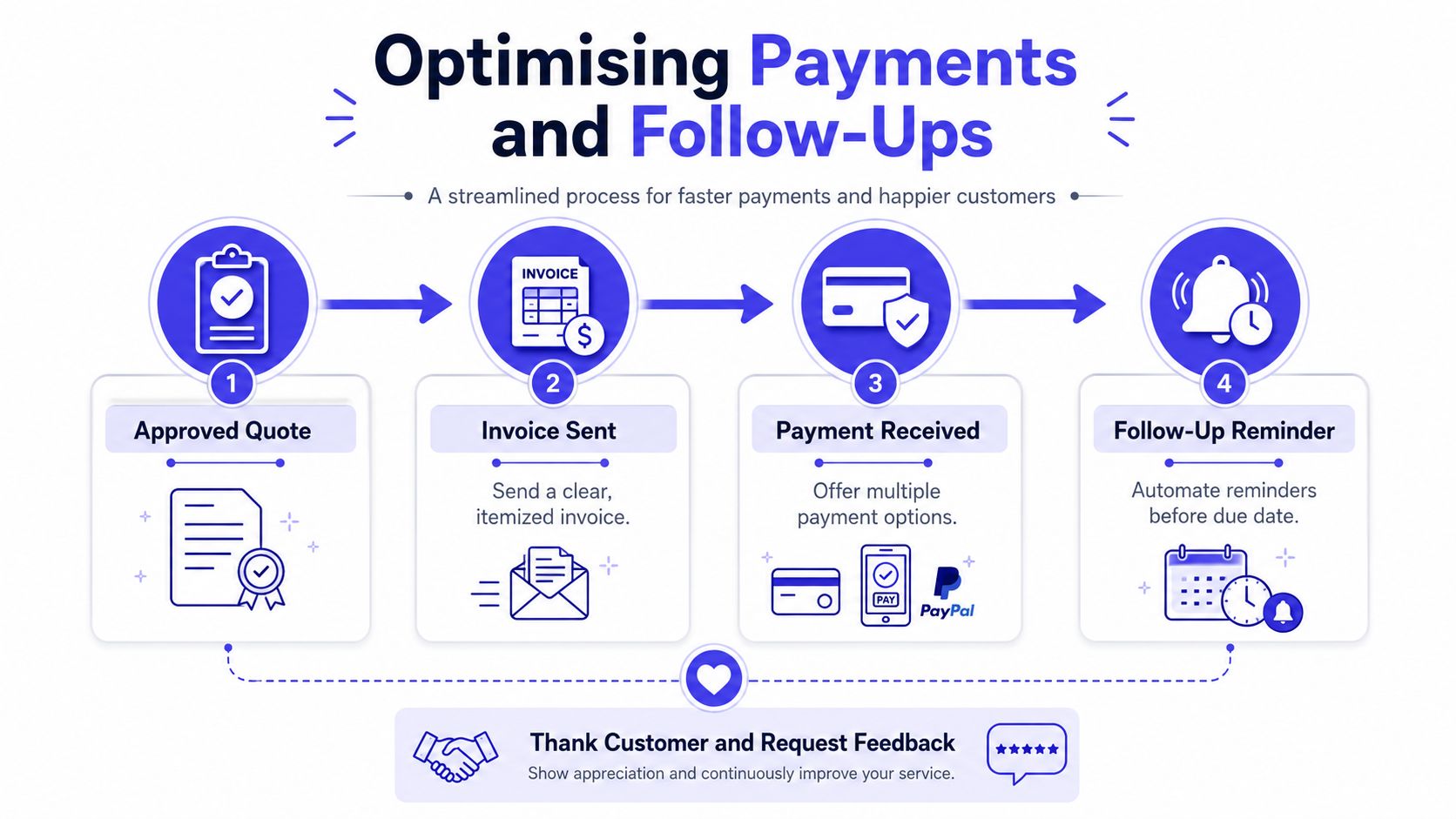
The conversion job isn't finished when the quote gets approved. For many service businesses, the hardest loss happens after the client has already said yes. Recent UK payment research shows 34% of UK businesses still receive most payments on average seven days or more after an invoice falls due, and 54% of businesses say late payment has a negative financial impact, which makes payment leakage a conversion issue as much as a cash flow issue. Calendly's UK payment discussion puts that delay in the right context, the bottleneck often appears after the sale, not before it.
Make payment effortless but compliant
In the UK, the Payment Services Regulations 2017 implement Strong Customer Authentication for most electronic card payments, so a simple-looking payment page still has to support the right security checks. That means smoothness has to sit beside compliance, not replace it. A good payment flow makes the secure step feel expected, not surprising.
The cleanest invoice journey is usually the one that puts the payment link in front of the client immediately and explains what they're paying for in plain language. If a customer has to search through an attachment or ask where to click, the process is already slowing down.
Follow up without sounding impatient
Automated reminders do better when they sound factual, not emotional. A payment reminder should tell the client what's due, when it's due, and how to settle it. The same applies to booking reminders and quote nudges, they should reduce effort, not apply pressure.
You can also use simple follow-up logic to keep past clients warm. A thank-you message after payment, a request for feedback, and a digital business card that makes it easy to reconnect all help the relationship stay active. That matters because repeat work is often easier to convert than first-time work.
For a practical payment setup, the guide on how to accept online payments is worth using as a reference point. It fits well with the operational reality of service businesses, where invoicing and payment collection need to be part of the same workflow.
Using Analytics and A/B Testing
Good conversion decisions come from behaviour, not hunches. If you know which page people abandon and which action they complete, you can test improvements in a controlled way. If you don't, you're just redecorating the funnel and hoping for a better outcome.
Test one thing at a time
Start with the highest-friction page from your audit. Then test one variable only, for example two CTA phrases on a quote approval page or two booking form layouts. If you change the button text, the headline, and the layout at once, you won't know which change mattered.
A/B testing doesn't need to be complicated. One version keeps the existing page, the other version changes a single element, and both are shown to similar visitors. If the new version outperforms the old one over a sensible period, you roll it out. If it doesn't, you keep the original and move on.
Track the right numbers
For service businesses, the useful metrics are simple, page visits, form starts, form completions, quote approvals, invoice opens, and invoice payments. Those numbers tell you where attention turns into action, and where it leaks away. If you need a plain-English refresher on dashboards and reporting, AetherCloud's business analytics overview is a useful place to anchor the conversation.
When clients go quiet on quotes, the reason is usually somewhere in the process rather than in the copy alone. If you want a broader angle on that behaviour, this discussion of why clients go silent on quotes is a helpful reminder that the quote itself is only one part of the handoff.
Test for decision-making, not decoration. A prettier page that doesn't improve completion is still a weak page.
The steady habit is what matters. Review what changed, watch the funnel response, and keep the winner only when the data supports it. That's how small improvements compound into a stronger conversion system.
Implementation Checklist and Next Steps
Start with the pages and steps that already have buying intent. A quick audit of your enquiry, quote, booking, and payment flow usually reveals more than a redesign ever will. If you can reduce friction at the exact moment a client is ready to act, you'll see better results without needing more traffic.
Prioritise the quickest wins
- Map your three core funnels, appointment booking, quote approval, and invoice payment, so you know where people leave.
- Remove non-essential fields, especially on public forms where every extra question creates resistance.
- Rewrite the CTA copy, so the action sounds like the next sensible step rather than a vague prompt.
- Add clear payment links, so invoices don't depend on a client searching through emails.
- Set a simple follow-up sequence, with reminders, thank-yous, and a clear route back to you.
Those changes don't need to be large to matter. They just need to be consistent across the journey.
Build a routine, not a one-off fix
After the quick wins, create a monthly review of your funnel data. Check where drop-off increased, which page gets the most hesitation, and which action still depends on manual chasing. Then test one improvement at a time and keep the change only when it makes the process easier for the client.
The businesses that improve most are usually the ones that treat every interaction as part of the same operating system. Quotes, scheduling, invoicing, payments, and client records all need to work together if you want fewer leaks and faster cash collection.
If you want to manage appointments, quotes, invoices, and payments without stitching together multiple tools, AetherCloud gives UK service businesses one place to do it. It's built for a cleaner conversion journey, from first enquiry through to payment, so you can spend less time chasing and more time serving clients.