
Monday starts with three different tabs open. Your diary is on paper. Quotes are buried in email threads. Invoices live in a spreadsheet you swear you'll tidy up later. A customer rings while you're on-site, asks whether you can fit them in next week, and you can't answer confidently without checking two different places.
That's how a lot of UK service businesses run. Not because the owner is disorganised, but because the systems are. One app handles booking. Another creates invoices. Contact details sit in your phone, your inbox, and a notebook in the van. Work gets done, but admin keeps leaking into evenings and weekends.
The phrase practice management software doesn't help much either. Search for it and you'll mostly find content aimed at doctors, dentists, and clinics. That leaves everyone else wondering whether the term even applies to them. Yet most content on practice management software focuses on UK healthcare, creating a significant information gap for the UK's 5.5 million other small service businesses.
Table of Contents
- Your Introduction from Chaos to Control
- What Is Practice Management Software Really
- The All-in-One Workflow Core Features Explained
- Who Needs This Software in the UK
- Your Selection and Implementation Checklist
- Calculating the Real ROI Cost Versus Value
- Get Started with AetherCloud Today
Your Introduction from Chaos to Control
A sole trader electrician recently described his setup to me in a way that will sound familiar to plenty of readers. Appointments in a wall calendar. Estimates typed from old Word files. Customer notes saved in text messages. Invoices sent when he got home, if he still had the energy. Nothing was completely broken, but nothing joined up.

That's the problem. Most small service businesses aren't struggling because they lack effort. They're struggling because each task sits in a different place, so every small job creates more admin than it should.
Practical rule: if you have to retype the same customer details into more than one system, your admin setup is already costing you time.
For tradespeople, consultants, freelancers, beauticians, tutors, repair firms, and agencies, the word “practice” means the day-to-day running of the business. Your appointments, client records, quotes, invoices, payments, and follow-ups are all part of that practice. You don't need medical records or NHS integrations. You need control.
A good practice management setup gives you one place to run the operational side of the business. It cuts down the handoffs between apps, reduces missed steps, and makes it easier to look organised in front of customers. It also gives you a way out of the habit many small firms fall into, where growth just means more copying, chasing, and patching together workarounds.
What Is Practice Management Software Really
At its simplest, practice management software is the digital control panel for your business. It's where your bookings, client details, quotes, invoices, and payments connect instead of living in separate tools.
That matters because admin errors usually happen in the gaps. A customer approves a quote by email, but nobody updates the invoice. A booking gets changed over the phone, but the spreadsheet still shows the old time. An address sits in one app while the invoice pulls a different one from somewhere else. The business owner ends up acting as the integration layer.
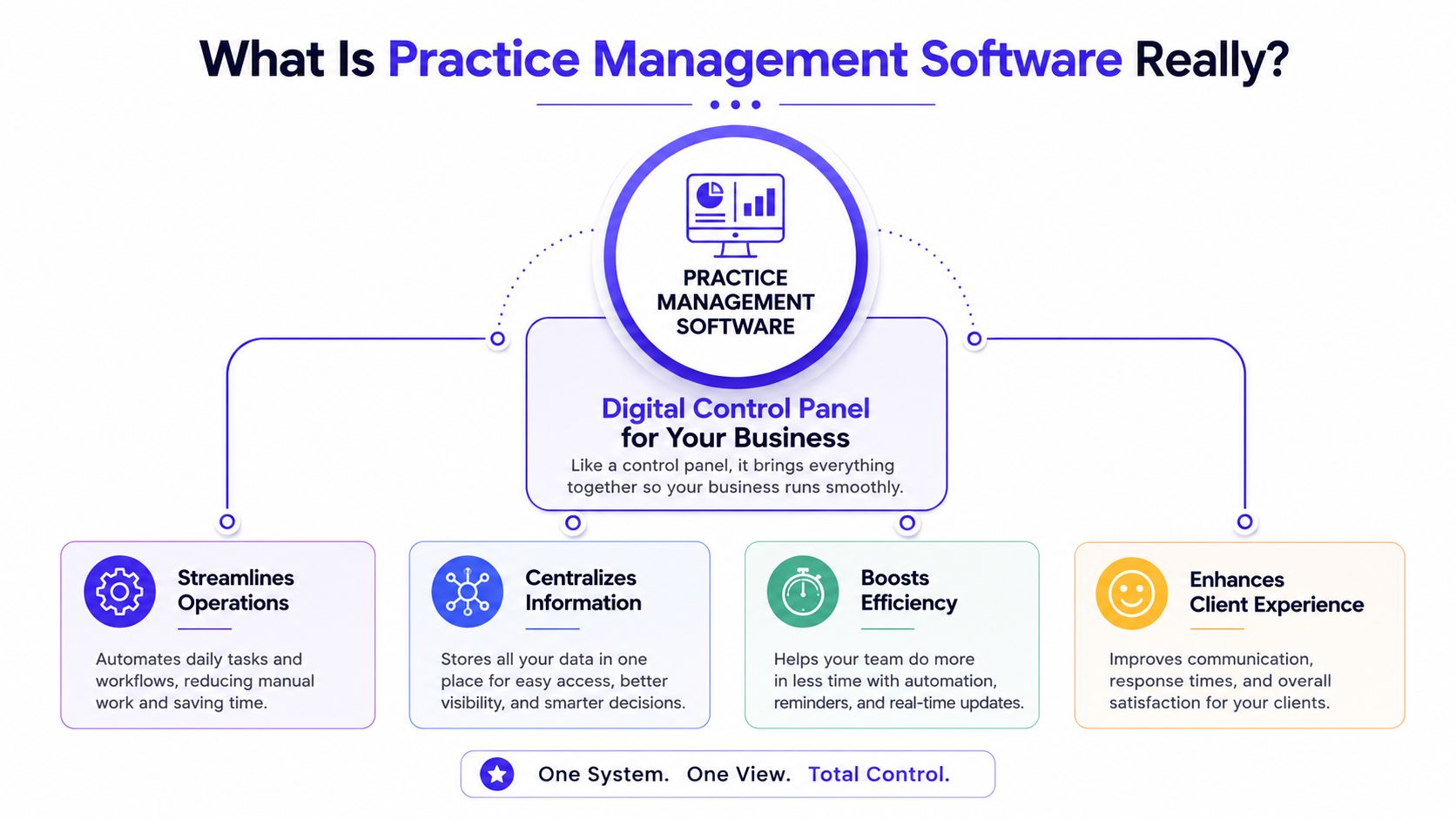
One system instead of a stack of workarounds
Fortune Business Insights notes that practice management system software streamlines administrative tasks by handling scheduling, billing, and record management in a centralised system. For a UK non-healthcare business, that centralisation offers significant value.
A fragmented tool stack usually creates the same problems:
- Client information drifts: names, numbers, and job details don't match across tools.
- Admin gets duplicated: you write the same details in the calendar, quote, and invoice.
- Follow-up becomes reactive: you chase late approvals and overdue invoices manually.
- The customer experience feels uneven: one message is polished, the next looks improvised.
A central system doesn't remove all admin. It removes avoidable admin.
What it should feel like in practice
When it's working properly, you open one dashboard and understand the state of the business quickly. You can see who enquired, who's booked in, which quotes are waiting, what's been invoiced, and what still needs payment. That's a big shift from hunting through tabs and inboxes.
If you're still unclear on the reporting side, this short guide to business analytics for small businesses is worth reading alongside the operational side of practice management.
A useful test is this. Can a new enquiry move from first contact to paid invoice without you copying the same information between systems? If not, you're still managing software rather than managing the business.
The All-in-One Workflow Core Features Explained
The strongest systems don't just offer a list of features. They connect those features into one flow. That's why integrated platforms matter. In the UK, integrated practice management software suites that combine scheduling, billing, and reporting command a 61.88% revenue share of the market.
At a practical level, the workflow should feel simple. Someone finds you, books or enquires, becomes a contact, receives a quote, approves it, gets an invoice, and pays online. The more steps that happen inside one system, the fewer mistakes you make.
A unified setup looks more like this in daily use:
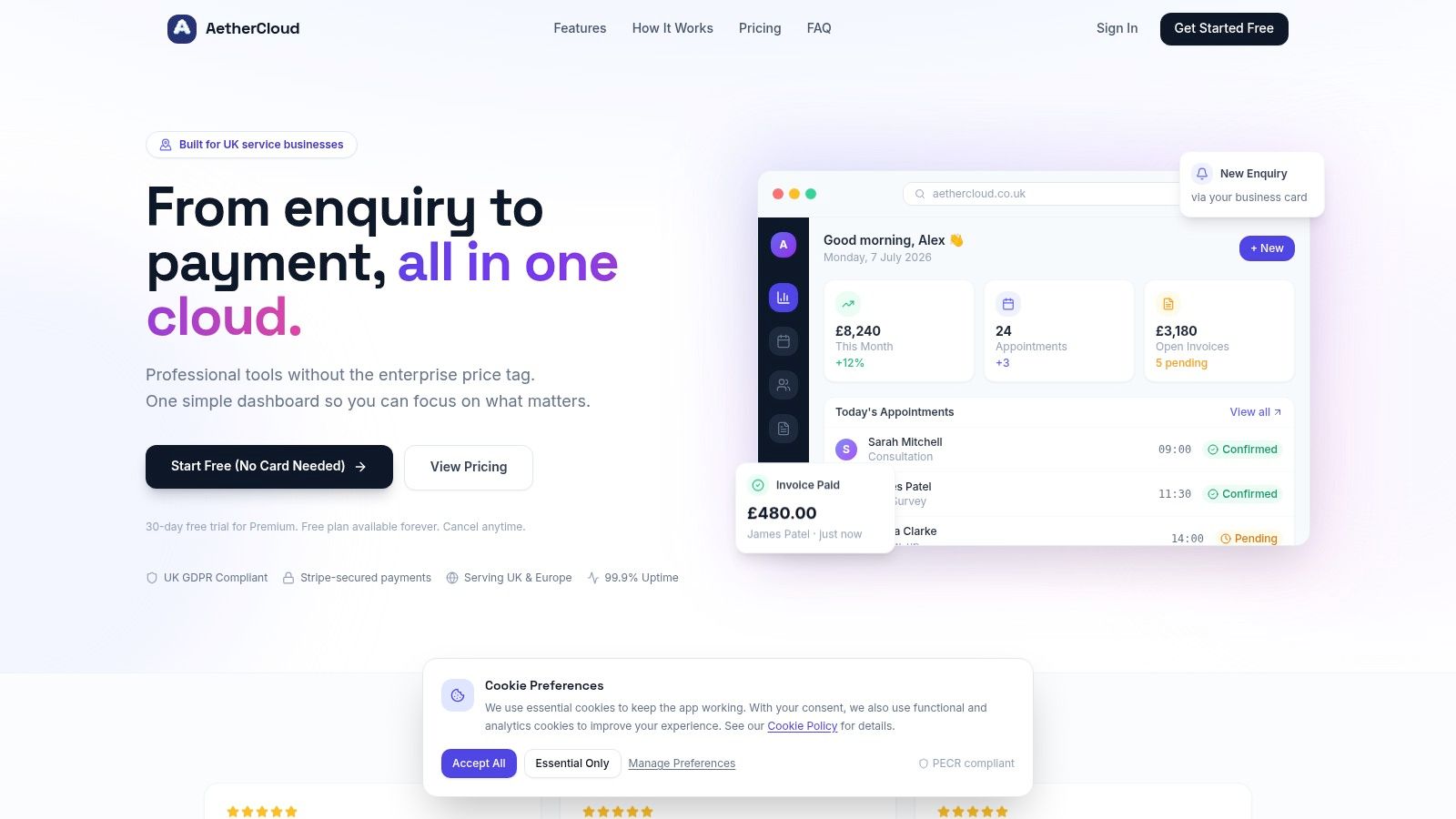
Scheduling
Scheduling isn't just about filling a calendar. It's about protecting time, reducing back-and-forth, and making it easier for customers to say yes.
For a consultant, that might mean sharing available slots instead of sending five emails to land on one meeting. For a tradesperson, it means seeing the week clearly enough to avoid overbooking or forgetting travel time. For a beautician, it means keeping repeat appointments organised without relying on memory.
Good scheduling software should do three things well:
- Show availability clearly: you need one reliable calendar, not mental arithmetic.
- Connect bookings to customer records: every appointment should sit against the right person.
- Support changes without confusion: reschedules and cancellations should update the same record, not create duplicates.
If your diary planning still depends on ad hoc notes, using structured time in motion templates can help you see where bookings, travel, and admin are eating into the day.
Client Management CRM
CRM sounds more complicated than it is. In a small service business, it means keeping contact details, enquiry history, notes, and job context in one place.
Without that, every customer interaction starts cold. You can't quickly see what was promised, when they last booked, or whether they've got an unpaid invoice sitting in the background. That's where professional businesses lose polish. The customer feels the disconnect immediately.
A lightweight CRM is usually enough for SMEs. You don't need enterprise sales pipelines. You need to know who the client is, what they need, and where the job stands.
| Need | What a connected CRM helps you do |
|---|---|
| New enquiries | capture details once and reuse them later |
| Returning clients | view past work without digging through email |
| Team handover | keep notes visible instead of stuck in one person's head |
| Follow-up | contact the right people at the right time |
Quoting
Quotes are often where momentum gets lost. The work may be a perfect fit, but the customer waits too long, the wording is inconsistent, or approval gets handled through a messy email chain.
A proper quoting workflow should let you create a quote quickly, send it in a professional format, and track whether it's still waiting, approved, or needs changes. The less friction there is here, the easier it is to convert interest into booked work.
The difference is especially noticeable when you stop treating the quote as a dead-end document. In a good system, the quote is the start of the commercial workflow, not a file that has to be rebuilt later.
Send quotes while the job is still fresh in the customer's mind. Delay rarely improves conversion.
A plumber quoting for a boiler repair, a designer pricing a branding package, and a tutor sending a monthly tuition plan all need the same thing. Clear scope, quick approval, and no retyping later.
Invoicing
Invoicing should be the easiest part of the process, but in many firms it's where admin piles up. Someone checks the accepted quote, copies details into a new template, edits VAT lines, adds bank information, exports a PDF, then sends a separate payment message afterwards.
That routine creates avoidable points of failure. Wrong totals. Missed references. Delayed sending. Forgotten follow-up.
A connected invoicing tool solves that by turning approved work into an invoice without rebuilding it from scratch. It also gives you a clean record of what's outstanding, paid, or overdue.
The best invoice workflow is not the fanciest. It's the one that gets sent promptly and is easy for the customer to understand.
Online Payments
Late payment often starts before the due date. It starts when paying you is awkward.
If the customer has to copy bank details manually, search an old email, or call you to check the amount, payment gets pushed down their list. If the invoice includes a clear online payment route, you remove excuses and speed up the final step.
Integrated systems offer an advantage over disconnected tools, as payment status can sit directly beside the invoice rather than being tracked in a separate spreadsheet.
After seeing the workflow in action, this overview gives a useful visual summary:
Digital Business Cards
Digital business cards are underrated for small service firms. Most owners think of them as a nice extra, but they often fix a real operational problem. People can't book, ask for a quote, or even save your details easily if your business information is scattered across WhatsApp, Instagram, email signatures, and old PDFs.
A good digital card gives prospects one current profile with your contact details, service information, and next-step links. That's especially useful for mobile businesses and field-based teams.
It also helps with lead capture. Someone meets you at a networking event, on a job, or through a referral. Instead of promising to “send something later”, you give them one clean destination.
Analytics
Analytics doesn't have to mean complex dashboards. For a small business, it means seeing enough of the numbers to make better decisions.
That might include:
- Revenue visibility: what's been invoiced and what's been paid
- Activity tracking: how many quotes are waiting and how many jobs are booked
- Customer trends: who buys repeatedly and who goes quiet
- Operational bottlenecks: where work slows down between enquiry and payment
The practical benefit is simple. You stop running the business from gut feel alone. Even basic reporting is useful when it sits on top of live scheduling, quotes, invoices, and payments rather than disconnected exports.
Who Needs This Software in the UK
A lot of owners still assume practice management software is only for clinics or larger firms. In reality, it fits any service business where customer work moves through booking, delivery, and payment.
Mark the plumber
Mark spends most of the day on the road. Before using a central system, he took bookings by phone, scribbled addresses in a notebook, and sent quotes in the evening from his laptop. If a customer approved while he was out, the follow-up often waited until late that night.
Once everything sits in one place, the workday changes. Mark can check appointments, client details, and quote status between jobs. He sends an invoice as soon as the work is finished instead of adding “billing” to a growing list for later.
The biggest improvement isn't sophistication. It's speed and consistency.
Sarah the business consultant
Sarah's business looks tidy from the outside, but the admin has grown messy behind the scenes. Her calls are booked in one tool, proposals are written in another, and invoice tracking happens in a spreadsheet she updates manually. A delayed approval means she has to piece together context from email chains before billing can even start.
With practice management software, the client journey becomes much cleaner. Enquiries, meetings, proposals, invoices, and payment status all sit together. She can see what each client has agreed, what's due next, and which projects are drifting commercially even if the work itself is moving well.
Clients rarely notice your internal admin until it goes wrong. Then they notice all of it.
For consultants, that joined-up view is often the difference between looking boutique and looking improvised.
Chloe the beautician
Chloe runs a steady appointment business, but her week gets disrupted by reschedules, missed messages, and payment chasing. Repeat customers text her directly. New customers arrive through social media. Notes about preferences and past visits sit in different places.
A central system gives her one record per client and one calendar she can trust. Booking changes don't disappear into DMs, and each appointment can link directly to the right person and payment trail. She also looks more professional because confirmations, quotes where needed, and invoices follow the same format every time.
For service businesses like Chloe's, the software doesn't replace personal service. It protects it by reducing the admin clutter around it.
Your Selection and Implementation Checklist
Buying the wrong system creates a fresh layer of admin. You end up paying for software that still needs patching with other tools, or one that technically works but doesn't fit how UK businesses invoice and operate.
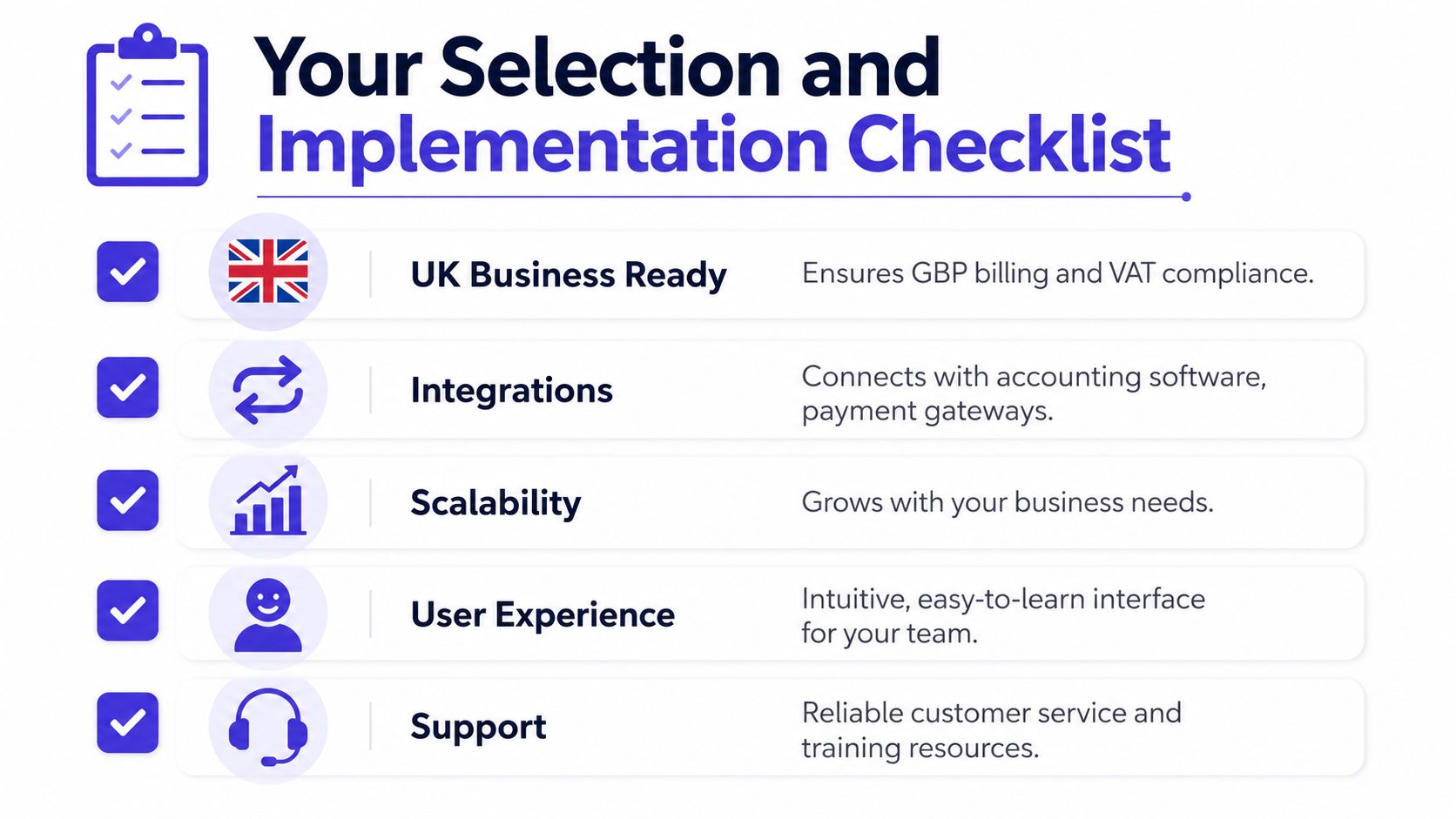
Cloud-based solutions captured 45.2% of the market share in 2024 due to their scalability and cost-effectiveness. For small and medium-sized UK firms, that makes sense. You want access from anywhere, easier setup, and less dependence on local machines.
What to look for before you buy
Use this as a practical filter rather than a feature wishlist.
- Built for UK trading: it should support GBP billing and VAT-ready invoicing without awkward workarounds.
- Clear data handling: if you're storing customer details, the provider should align with UK GDPR and the Data Protection Act 2018.
- Actually all-in-one: check whether quotes, invoices, payments, scheduling, and contact management live together or whether “integration” really means more subscriptions.
- Easy to learn: if basic tasks take too many clicks, your team won't use it properly.
- Support that's reachable: onboarding matters most when you're moving live customer work into a new system.
A short comparison table can help keep the evaluation honest:
| Question | Good answer | Red flag |
|---|---|---|
| Can you quote and invoice in the same system? | yes, directly | needs export or copy-paste |
| Can customers respond or pay through shared pages? | yes, with minimal friction | requires manual confirmation |
| Does it fit UK invoicing norms? | yes | mostly built around another market |
| Can a small team learn it quickly? | yes, intuitive layout | heavy training needed for basics |
How to roll it out without disruption
Implementation doesn't need a long project plan. Small firms usually do best with a focused setup over a short period, starting with live essentials.
- Set up company details first. Add your legal trading name, address, billing settings, VAT information, and payment preferences.
- Clean your client list before import. Remove duplicates, old contacts, and incomplete records. Bad data moved into a new system is still bad data.
- Create your core templates. Build one quote template and one invoice template you're happy to send every day.
- Connect payments early. Don't leave the final step for later. Payment collection is part of the workflow, not an optional add-on.
- Move one process at a time. Start with new enquiries and new jobs. You don't need to migrate every historic record before seeing value.
If your current admin is trapped in messy sheets, this guide on how to create a spreadsheet that's actually usable is a helpful bridge before you move into a proper system.
A simple implementation rule: standardise first, migrate second. If your quote formats and client records are inconsistent, fix that before you import anything.
Calculating the Real ROI Cost Versus Value
Too many owners judge practice management software by the monthly subscription and stop there. That's the wrong comparison. The true comparison is between the subscription and the cost of running the business through manual steps, disconnected apps, and delayed admin.
Only 15% of private businesses in the UK have adopted at least one AI tool. That means most businesses are still relying on manual administration somewhere in the workflow, even when better systems are available.
What the monthly fee hides
The direct software fee is visible. The hidden costs are not.
- Time lost to duplication: typing the same customer details into multiple tools
- Slow billing: finished work that isn't invoiced promptly
- Chasing debt manually: sending reminders one by one
- Subscription sprawl: paying separately for booking, CRM, invoicing, and payment tools
- Small mistakes with real consequences: wrong totals, missed appointments, unclear job history
Those costs rarely appear in one line on the P&L, but they show up in evenings spent on admin and cash flow that feels tighter than it should.
Where the return actually comes from
The return usually comes from four places.
First, you reclaim owner time. Hours once spent stitching information together can go back into paid work, sales follow-up, or finishing the day on time.
Second, you invoice faster. Work that's completed gets billed while it's still current, which improves cash flow rhythm.
Third, you make it easier for customers to pay. That's where connected payment options matter. If you're still relying on manual bank transfer instructions, this guide on how to accept online payments is a useful next read.
Fourth, you reduce friction across the whole customer journey. Cleaner quotes, tidier records, and visible invoice status all make the business look more competent. That has value, even if it doesn't sit in a single metric.
A lot of firms buy software hoping for automation. The better reason is control. Better visibility, fewer dropped steps, and less dependence on memory create a business that's easier to run.
Get Started with AetherCloud Today
If you've been managing appointments in one place, customer details in another, and billing somewhere else entirely, the problem isn't you. It's the setup. Practice management software gives UK service businesses a more sensible way to run the work behind the work.
For tradespeople, consultants, agencies, freelancers, and local service firms, the goal is straightforward. Keep bookings organised. Turn quotes around quickly. Send invoices without delay. Let customers pay easily. See what's happening in the business without digging through four different tools.
AetherCloud was built around that exact reality for UK service businesses. It brings scheduling, CRM, quoting, invoicing, payments, digital business cards, and analytics together in one simple system, with UK-focused essentials such as GBP billing, VAT-ready invoicing, and compliance with UK GDPR and the Data Protection Act 2018.
If you want to stop stitching together apps and start running your operations in one place, you can explore AetherCloud here. It's a practical next step if you want to look more professional, stay organised, and get paid with less friction.
AetherCloud gives UK service businesses one place to manage scheduling, client records, quoting, invoicing, online payments, digital business cards, and analytics. If your current setup still depends on spreadsheets, inbox searches, and too many separate apps, try AetherCloud to streamline your workflow.