
You're probably doing this already. A client asks for a quote while you're between jobs, you tap out a quick email on your phone, attach a file called “quote final new v2.pdf”, and hit send before the next appointment. Then nothing happens for two days.
Most service businesses don't lose trust in one dramatic moment. They lose it in small signals. A vague subject line. A rushed greeting. An email that buries the actual ask. A missing signature. When a client can't meet you in person, your email becomes the version of you they judge.
Knowing how to write a professional email isn't about sounding corporate. It's about making it easy for a client to understand what you need, what happens next, and why you're worth taking seriously.
Table of Contents
- Why Your Emails Are Your Digital Handshake
- The Anatomy of a Perfect Professional Email
- Crafting the Right Tone for UK Clients
- Email Templates for Common Business Scenarios
- Signatures Attachments and UK Legal Compliance
- Your Final Professional Email Checklist
Why Your Emails Are Your Digital Handshake
A plumber sends this email from his van after a site visit:
Hi mate, attached quote. Let me know. Cheers
It's fast, but it leaves work for the client. Which quote is this? What does it cover? When does it need approval? What happens after they say yes? A message like that doesn't make the sender look efficient. It makes the job feel vague.
Now compare it with a message that says what the quote is for, what the client needs to do, and when the next slot is available. Same service. Same price. Different level of confidence.

That's why emails matter so much for trades, consultants, agencies, and freelancers. They stand in for the office, the reception desk, and often the sales process too. If your emails are clear, clients feel safe saying yes. If they're messy, clients pause.
Professional emails also shape speed. A client who immediately understands the ask is more likely to approve the quote, confirm the booking, or pay the invoice without a follow-up. Good communication isn't separate from cash flow. It sits right in the middle of it.
A lot of businesses focus on websites and social posts, but regular email habits often do more to build trust in day-to-day operations. That's why strong client communication sits alongside wider customer engagement strategies for service businesses.
The small mistakes clients notice
- Unclear subject lines: “Quote” is harder to find later than “Kitchen rewiring quote for 14 Albert Road”.
- Missing next step: If you don't ask for approval, clients won't always know what to do.
- Rushed presentation: Typos, odd formatting, and thin signatures make a real business look improvised.
The Anatomy of a Perfect Professional Email
The best professional emails are easy to scan. They don't try to impress with clever wording. They help the reader act quickly.
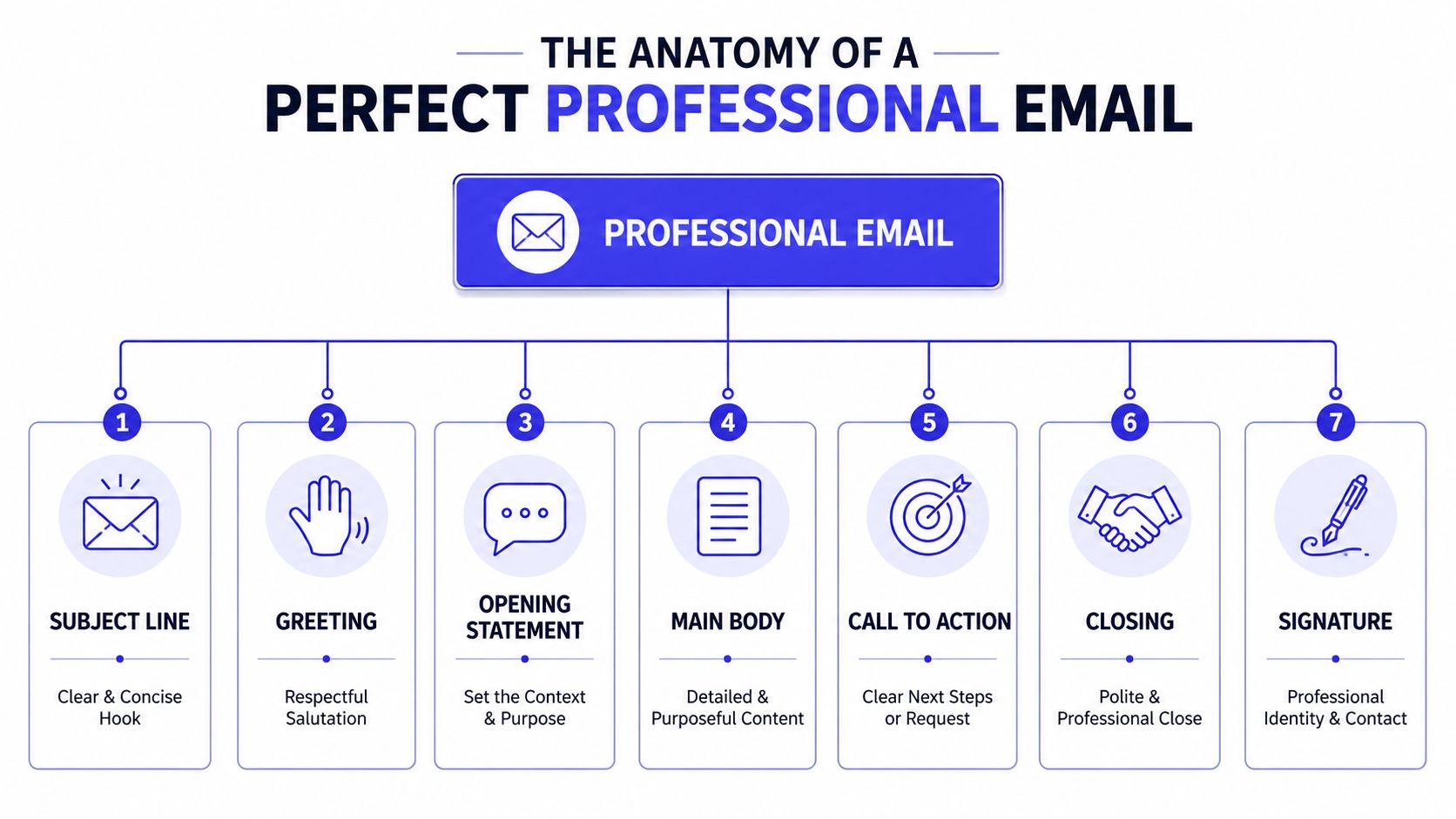
Start with a subject line that earns attention
Your subject line does two jobs. It gets opened, and it makes the email easy to find later.
Industry benchmarks recommend using subject lines of no more than 9 words and 60 characters to ensure readability on mobile devices. Limiting punctuation to three marks is also advised to avoid appearing spammy, ensuring your quotes and invoices are perceived as professional and trustworthy, according to Mailchimp's email marketing benchmarks guidance.
Good subject lines for service businesses tend to be plain and specific:
| Better subject line | Weaker subject line |
|---|---|
| Quote for boiler service at 18 King Street | Quote |
| Appointment confirmed for Tuesday at 10am | Booking info!!! |
| Invoice 1042 due 30 June | Payment |
Open politely and get to the point fast
A professional greeting in the UK should feel respectful without sounding stiff. “Good morning Sarah” or “Hello Mr Patel” works well for first contact. If you know the client already, “Hello Sarah” is usually enough.
After that, lead with the point. The UK Government Communication Service guidance on writing effective emails recommends the inverted pyramid approach: put the summary, the ask, and the deadline in the first sentence. The same guidance notes that including the action and time needed in the subject line, such as “Please approve this quote in 2 minutes”, can lead to 20% faster responses.
Practical rule: If the client only reads the first line, they should still know what you want from them.
A solid opening looks like this:
- Quote email: “Please review and approve the attached quote by Thursday if you'd like me to hold next week's installation slot.”
- Appointment email: “Your appointment is booked for Wednesday at 2pm. Please reply if access details have changed.”
- Invoice email: “Your invoice is attached below. Please use the payment link to settle it by the due date shown.”
End with one action and a proper signature
Many emails fail because they ask for too much. Don't end with three requests. Give the reader one clear action.
Try these closings:
- Approval needed: “Please reply with your approval and I'll book the work in.”
- Information needed: “Please send over the site photos so I can finalise the estimate.”
- Payment needed: “Please use the payment link in this email once convenient.”
Then close with a professional sign-off such as “Kind regards” or “Best regards”.
Your signature should make it easy to contact you and verify who you are. Include your full name, role, business name, phone number, and relevant company details. That matters for credibility, and in some cases it matters for compliance too.
Before sending, save the draft and re-read it with fresh eyes. That pause catches more mistakes than expected.
Crafting the Right Tone for UK Clients
Tone is where many otherwise solid emails go wrong. The wording may be clear, but the message lands badly because it sounds either too cold or too casual.
In the UK, professional email etiquette requires a reply within 24 working hours to demonstrate reliability, and the tone should avoid slang and emojis while favouring formal greetings such as “Good morning” rather than a casual “Hi”, as outlined in GetMailbird's summary of professional email practices. That doesn't mean every message has to sound rigid. It means your default should be respectful.
Formal first, warmer later
For a first enquiry, stay more formal than you think you need to. You can always relax slightly once the relationship is established.
A useful way to judge it:
- Formal: Best for first contact, complaints, quote disputes, and payment issues.
- Semi-formal: Best for ongoing client work, appointment updates, and project questions.
- Informal: Fine only when the relationship is established and the context is low risk.
Here's the difference in practice:
“Good afternoon Ms Walker, thank you for your enquiry. I've attached the estimate for your review.”
That sounds safe and professional.
Compare it with:
“Hiya, here you go. Shout if any questions.”
That might be fine with a long-standing client. It's weak for a new prospect deciding whether to trust you.
Direct without sounding abrupt
One gap in a lot of UK email advice is tone within operational messages. The Academy's guide to UK business emails notes that guides often stress clarity but miss the need for softening language such as “Perhaps we could...” when sending quote follow-ups or invoice reminders.
That matters because the wrong tone can slow decisions.
Use phrases like these:
- For follow-ups: “Just checking whether you've had a chance to review the quote.”
- For scope clarification: “Perhaps we could confirm whether disposal is included before I revise the price.”
- For payment reminders: “I wanted to check that the invoice reached you safely.”
A softer opening doesn't weaken the message. It removes unnecessary friction. In the day-to-day sales cycle for service businesses, that often means fewer awkward exchanges and quicker replies.
Email Templates for Common Business Scenarios
Templates save time, but only if they're built around real client decisions. The goal isn't to sound scripted. The goal is to avoid rewriting the same important message under pressure.
Often, a lot of admin gets repetitive. A quote becomes an approval request, then a booking confirmation, then an invoice, then a reminder if payment stalls.
Replying to a new enquiry
Use this when someone fills in a form, calls, or messages asking for help.
Subject: Re Your enquiry about [service]
Hello [Client Name],
Thank you for getting in touch about [brief description of job or project].
I'd be happy to help. To prepare the right quote, please reply with [photos / preferred dates / postcode / key requirements]. Once I have that, I'll send over the next steps.
Kind regards,
[Your Full Name]
[Business Name]
[Phone Number]
Why it works: it acknowledges the enquiry, sets a professional tone, and asks for the exact information you need.
Sending a quote or estimate
This email should make approval simple.
Subject: Quote for [job] at [location]
Good morning [Client Name],
Please find attached your quote for [job]. If you're happy to go ahead, please reply with your approval by [day or date], and I'll confirm the booking.
The quote includes:
- Labour: [brief note]
- Materials: [brief note]
- Timescale: [brief note]
If you'd like any changes, please let me know and I'll revise it.
Kind regards,
[Your Full Name]
[Business Name]
[Phone Number]
Why it works: the client can see what the quote covers and what to do next.
Confirming an appointment
This is the email that prevents no-shows, confusion, and last-minute back-and-forth.
Subject: Appointment confirmed for [day] at [time]
Hello [Client Name],
Your appointment is confirmed for [day, date] at [time] at [address].
I'll be attending to [brief service description]. If there are any access instructions, parking details, or changes before then, please reply to this email.
Best regards,
[Your Full Name]
[Business Name]
[Phone Number]
Why it works: it confirms the essentials in one place.
Here's a useful walkthrough on structuring practical business workflows, including client communications:
Sending an invoice with a payment link
The best invoice email removes excuses. It tells the client what the invoice is for, when it's due, and how to pay.
Subject: Invoice for [service] due [date]
Hello [Client Name],
Please find your invoice for [service or project] attached.
Payment is due by [date]. You can pay using the link below: [Insert payment link]
If you need a copy in another format or have any questions about the invoice, please let me know.
Kind regards,
[Your Full Name]
[Business Name]
[Phone Number]
Why it works: it pairs the invoice with a clear route to payment.
Chasing a payment politely
This one is where tone matters most. UK guidance often tells people to be clear, but doesn't give enough help on balancing clarity with client sensitivity. A softer message usually keeps the relationship intact while still moving things forward.
Subject: Quick check on invoice [number]
Good afternoon [Client Name],
I wanted to check that invoice [number] reached you safely.
The invoice was due on [date]. If payment is already in progress, please ignore this message. If helpful, I'm happy to resend the invoice or payment link.
Kind regards,
[Your Full Name]
[Business Name]
[Phone Number]
Why it works: it prompts action without sounding accusatory.
A few template habits worth keeping
- Keep names and job details specific: Generic emails feel automated, even when they aren't.
- Use one clear action: Approval, confirmation, payment, or reply. Not all four.
- Store your best versions: A reusable library of time-saving message templates cuts admin and keeps your standard consistent.
Signatures Attachments and UK Legal Compliance
Plenty of business owners write decent email copy and then lose professionalism in the final details. Attachments arrive with vague filenames. Signatures are incomplete. Automated quote and invoice emails go out without the business information a client expects to see.
Those details aren't cosmetic. They affect trust, speed, and in some cases legal compliance.
Attachments should remove friction, not create it
Treat every attachment as part of the client experience.
A good attachment rule set is simple:
- Use clear filenames: “Smith kitchen quote 24 June.pdf” is better than “quote-final-new.pdf”.
- Choose easy formats: PDF is usually the safest option for quotes, invoices, and terms.
- Mention the attachment in the email body: Clients shouldn't have to guess what they're opening.
If the file matters, describe it in one line. For example: “I've attached the revised quote including the optional disposal cost.” That gives context before the click.
Your signature is part branding, part compliance
Many UK guides list the basics for email signatures, but skip region-specific requirements. Shopify's UK email format article highlights that sole traders and micro-businesses may miss disclosure expectations under the Companies Act 2006 by not including details such as their registered company number, VAT number, or address in automated quote and invoice emails.
A signature isn't just a sign-off. It's part of how a client checks that your business is real.
As a practical standard, include:
- Full name and role
- Business name
- Phone number and email
- Registered company details where applicable
- VAT details where applicable
- Business address where required
That matters even more when emails link to public quote pages, invoice pages, or booking pages. If your business handles customer data through digital systems, it's also worth understanding your published privacy position and data handling terms, such as a clear privacy policy for customer information.
Your Final Professional Email Checklist
A strong email does five things well. It tells the client what the message is about, shows respect, gets to the point quickly, makes the next step obvious, and leaves a credible business trail.
The fastest way to improve is to check the same essentials every time.
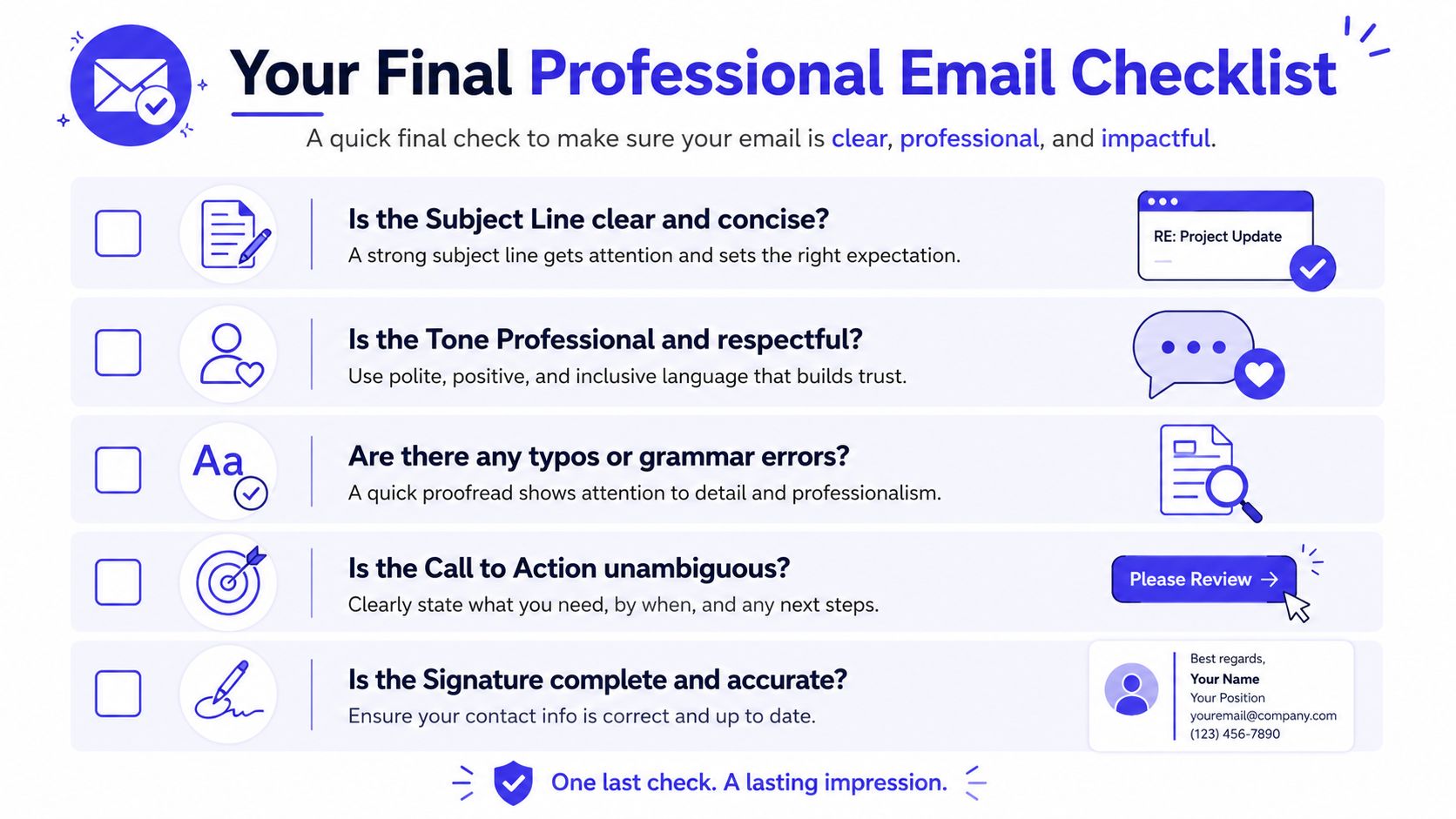
Before you hit send
- Check the subject line: Keep it specific and easy to search.
- Open with the key point: The UK Government's inverted pyramid email method advises putting the summary, ask, and deadline in the first sentence, and adding the action plus time needed in the subject line can lead to 20% faster responses.
- Use the right tone: Professional, polite, and free of slang or emojis.
- Proofread properly: Names, dates, prices, links, and attachments matter more than fancy phrasing.
- Check the signature: Make sure it's complete and accurate.
Good emails don't just look tidy. They shorten approval time, reduce confusion, and make your business easier to trust.
If you want to stay organised, save your best-performing templates, keep your files named consistently, and review your workflows regularly. Even something as simple as the right planning apps for small business admin can help you send better emails because the underlying information is easier to find.
If you want one place to handle the admin behind these emails, from quotes and appointments to invoices, payments, and client records, take a look at AetherCloud. It's built for UK service businesses that want to look more professional, stay organised, and spend less time jumping between disconnected tools.