
A payment gateway is the secure software layer that captures, encrypts, and routes a customer's card or wallet details at checkout so a payment can be authorised, without the merchant ever handling raw card data. For a UK service business, that usually means the difference between chasing bank transfers and letting clients pay on an invoice or booking page in a few clicks.
Table of Contents
- The Chase for Payment That Every UK Service Business Knows
- What a Payment Gateway Actually Does
- How a Payment Transaction Actually Flows
- Gateway Versus Processor Versus Merchant Account
- Security, Fees, and Features That Actually Matter
- UK-Specific Considerations You Should Not Overlook
- Where Payment Gateways Fit in a Service Business Workflow
- Choosing and Setting Up the Right Gateway for Your Business
The Chase for Payment That Every UK Service Business Knows
A plumber finishes a Thursday job, sends the invoice on Friday, then spends the next week checking for a bank transfer that arrives while he's up a ladder on another callout. That gap between “job done” and “money received” is where admin piles up, not because the work was poor, but because the payment process was clumsy.
Why this feels harder than it should
For many UK service businesses, the core problem isn't sending an invoice, it's what happens after. Someone has to wait, check bank statements, match references, update the job record, and sometimes chase the client again when the payment slips through the cracks. A payment gateway removes a lot of that friction because it lets the customer pay at the point of decision, on the invoice or booking page, instead of pushing the business back into manual follow-up.
Practical rule: if the payment requires a human to keep checking a bank feed, the process is still unfinished.
That matters most for trades, consultants, agencies, and freelancers, because they rarely want a separate checkout system built for retail stores. They need something that fits quote approval, invoice payment, and deposits for appointments, all without exposing card data to the business system.
See how AetherCloud approaches the workflow around quotes and invoices if you want to think about payments as part of the wider client journey, not as a bolt-on. The rest of this guide keeps things plain: what the gateway does, how the payment moves, where people mix up the terminology, and what matters when you choose one.
What a Payment Gateway Actually Does
A payment gateway is the secure software layer between your customer and the banking network. It captures payment details at checkout, encrypts them, and sends them for authorisation, while the processor and acquiring bank handle the transaction behind the scenes. In plain English, it's the routed checkpoint, not the vehicle carrying the money.
The airport check-in version
Imagine airport check-in. The gateway checks the documents, sends the passenger to the right gate, and keeps the process moving. It does not fly the plane. In payments terms, that means the gateway verifies and routes the request, then hands off the heavy lifting to other parts of the stack.
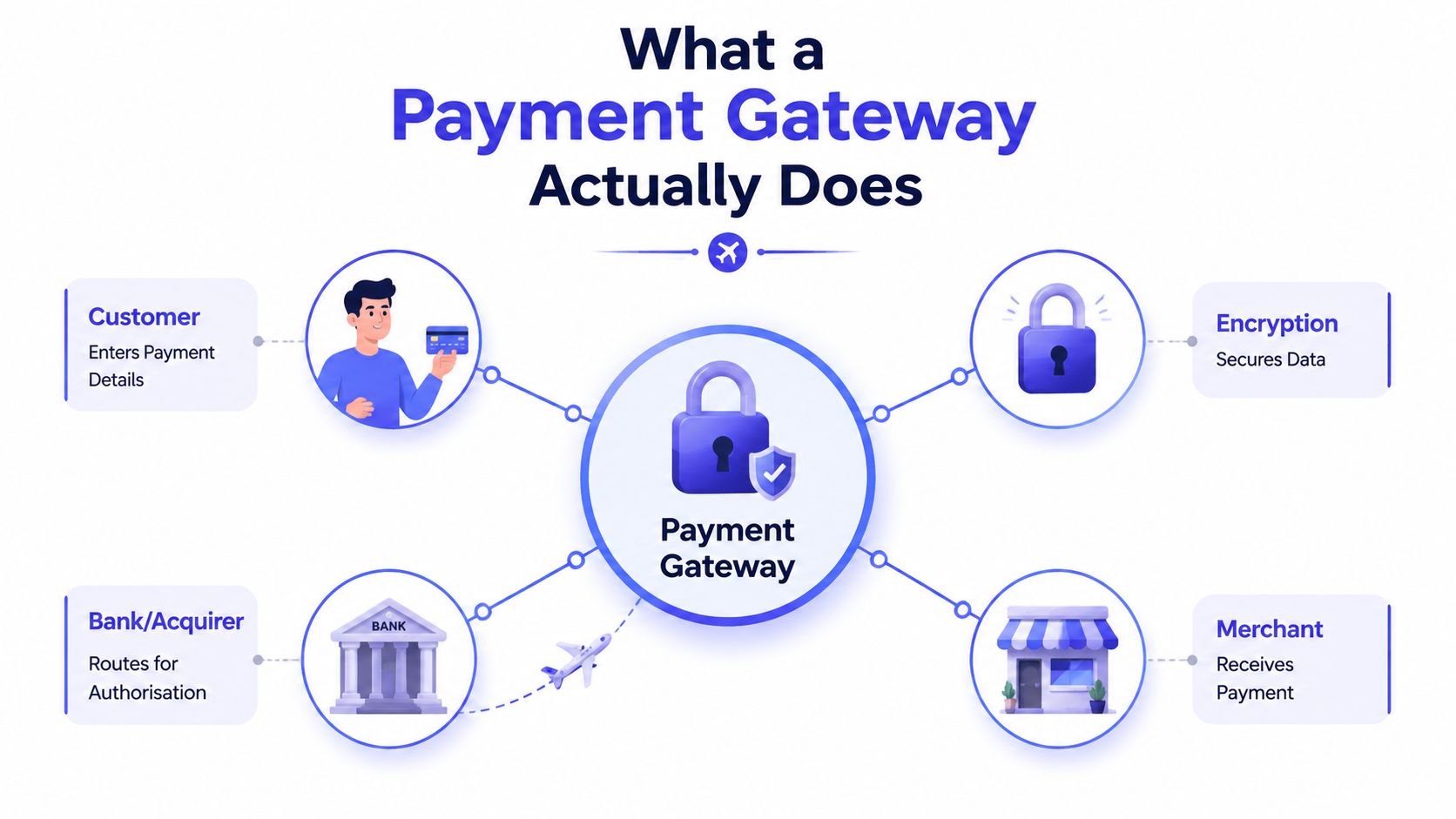
The useful bit for a service business is simple. Because the gateway removes raw card data from your own system, it reduces exposure and supports tokenisation, where sensitive card numbers are replaced with tokens so the actual card details don't sit on your server. That's why the gateway is a technical bridge between the customer, the merchant, the processor, and the bank networks rather than the entity that moves the funds itself, as described in Hyperswitch's explanation of payment gateway architecture.
What it means on invoice and booking pages
For a consultant sending an invoice link, the gateway sits in the payment step, not in the quote itself. For a salon taking a deposit at booking, it does the same job on the appointment page. The point is consistency, the customer sees a clear payment action, and the business avoids turning its own system into a place where card numbers are stored.
A good gateway should feel almost invisible to the customer. If they have to think hard about the payment step, the integration probably isn't clean enough.
That's why vendors often talk about “checkout”, “routing”, and “tokenisation” together. The gateway is the part that makes the handoff secure and fast, but it isn't the full payment stack.
How a Payment Transaction Actually Flows
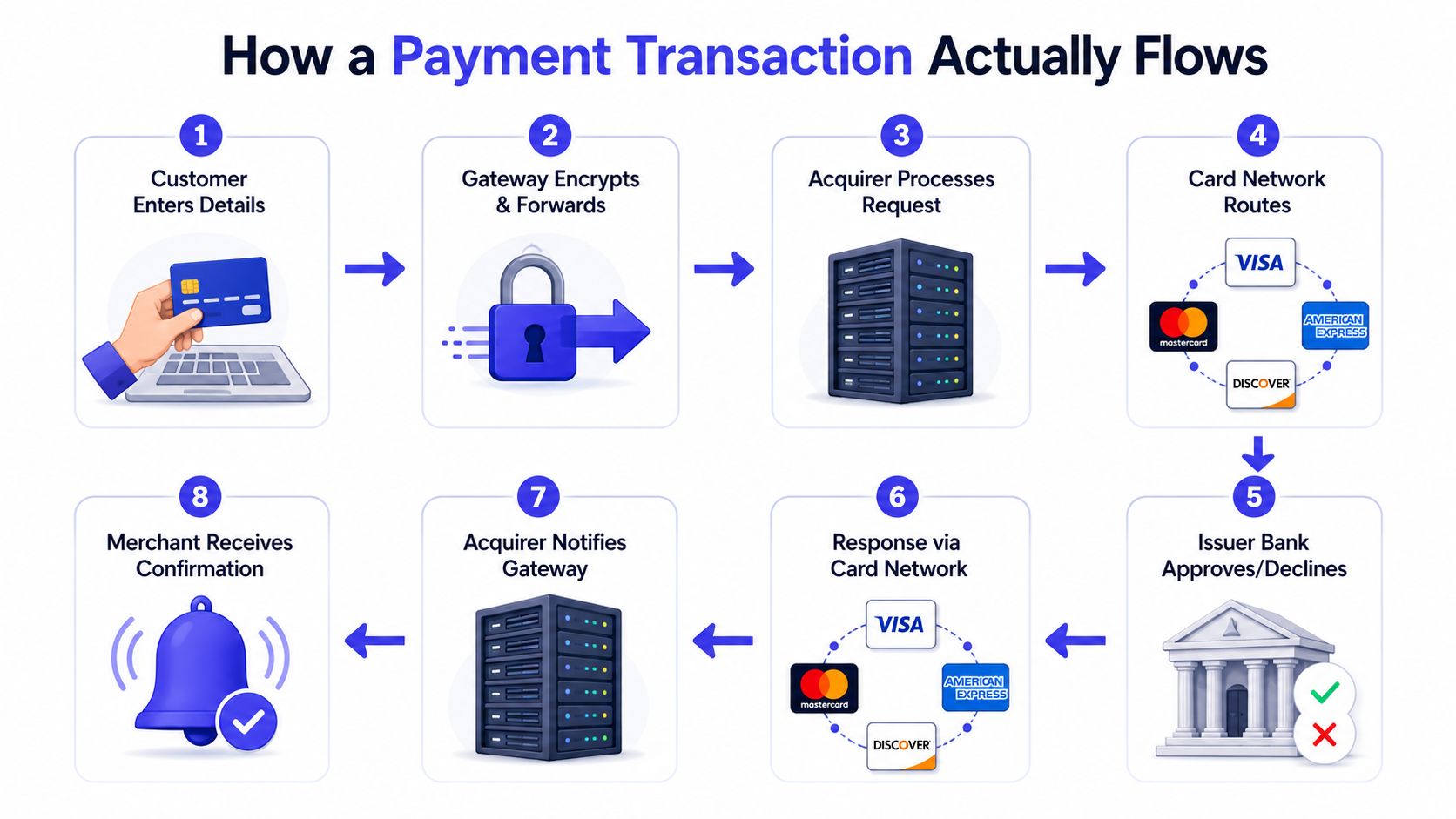
The transaction in plain steps
- The customer enters card details on your invoice or payment page.
- The gateway encrypts the details and forwards them into the payment network.
- The acquirer or processor picks up the request.
- The card network routes it to the cardholder's bank.
- The issuer bank approves or declines it.
- The response comes back through the network.
- The acquirer notifies the gateway.
- The merchant sees confirmation.
That flow is why “approved” and “paid into your bank” are not the same thing. The approval happens fast, often within a few seconds, but settlement is a later step through the wider payment chain. A business can mark an invoice as paid in its software before the bank transfer has landed, so your team still needs a clear status view for reconciliation.
The core mechanics are the same across card payments, whether the customer pays from a desktop browser or a mobile invoice page, and PayPal's overview of the gateway transaction flow describes that sequence clearly.
Why approval and settlement get confused
A client sees “payment authorised” and assumes the money is already in your account. Your finance view may say the payment is complete, but the actual settlement still has to move through the acquirer and banking rails. That gap is where service businesses get tripped up, especially if they only look at the invoice status and not the payout trail.
Tokenisation helps here too. Once a customer has paid before, the gateway can store a token instead of the raw card number, which keeps repeat payments smoother and reduces the amount of sensitive data your business ever touches. For invoice collections, that's a practical win, not a marketing flourish.
Gateway Versus Processor Versus Merchant Account
These three terms get mixed up constantly, and for a UK service business that confusion creates bad buying decisions. The gateway captures and routes the payment, the processor handles the transaction logic with the card networks, and the merchant account is the place where settled funds sit before they're paid out to your business bank account.
A quick side by side
| Component | What it does | What you notice day to day |
|---|---|---|
| Payment gateway | Handles secure data capture and routing | The customer pays on your invoice or booking page |
| Payment processor | Executes transaction logic with card networks | The approval or decline comes back quickly |
| Merchant account | Holds funds before settlement to your bank account | Payouts arrive later in batches |
A lot of modern providers bundle these parts together, which is why the sales copy can sound vague. Stripe's gateway overview makes the distinction useful by showing that the gateway usually sits inside a wider payments ecosystem and may charge per transaction, while processors, acquiring banks, and card schemes do the actual movement and settlement work.
What a service business actually needs
If you're taking online invoice payments, you don't need to become a payments architect. You need the three layers to behave as one clean workflow. The customer should be able to pay from the invoice, the payment should authorise reliably, and the funds should reconcile against the right job without someone manually stitching records together later.
Practical rule: if you can't trace a payment from invoice to payout without opening three systems, the stack is too fragmented.
That's why some businesses prefer a platform that wires invoicing, payment collection, and reporting together. It's not about having more jargon. It's about making sure the approval, settlement, and bookkeeping steps line up cleanly for the people doing the work.
Security, Fees, and Features That Actually Matter
UK payment gateway marketing tends to overstate the nice-to-have features and understate the basics. For a service business, the key questions are straightforward, does it keep card data protected, does it make payment easy, and does it show you what was paid, when, and by whom.
The features worth checking first
| Feature | Why a UK service firm needs it | Typical cost impact |
|---|---|---|
| PCI-DSS support | Protects card data and reduces your own compliance burden | Often built into the gateway setup |
| 3-D Secure | Adds an extra authentication step for remote payments | May be included, sometimes affects conversion |
| Tokenisation | Lets repeat customers pay without re-entering card numbers | Usually part of the payment stack |
| Payment status visibility | Helps you match invoice, payment, and payout quickly | Can reduce manual admin costs |
| Hosted payment page | Keeps raw card data off your own system | Often lowers implementation effort |
Fraud controls matter because the UK risk picture is still live. UK Finance reported that losses from unauthorised card fraud fell by 5% in 2024 to £722 million, while Cifas recorded a 13% rise in account takeover cases in 2024. Those figures are a reminder that authentication and account protection are not optional extras when clients pay remotely, they're part of the business case for using a decent gateway. GoCardless summarises those UK fraud indicators here.
How to think about fees properly
Gateway pricing often shows up as a percentage, a fixed fee, or both, and sometimes there's a separate platform charge. Don't compare headline rates in isolation. Compare the total cost per paid invoice, because a cheap-looking gateway that creates extra manual reconciliation can cost more in staff time than a slightly pricier one that fits your workflow better.
Use this approach to keep your payment records organised if you're still tracking quotes, invoices, and payments in a spreadsheet. The aim isn't the spreadsheet itself, it's visibility. You want to see whether a payment was authorised, settled, and matched to the right job without hunting through email threads.
UK-Specific Considerations You Should Not Overlook
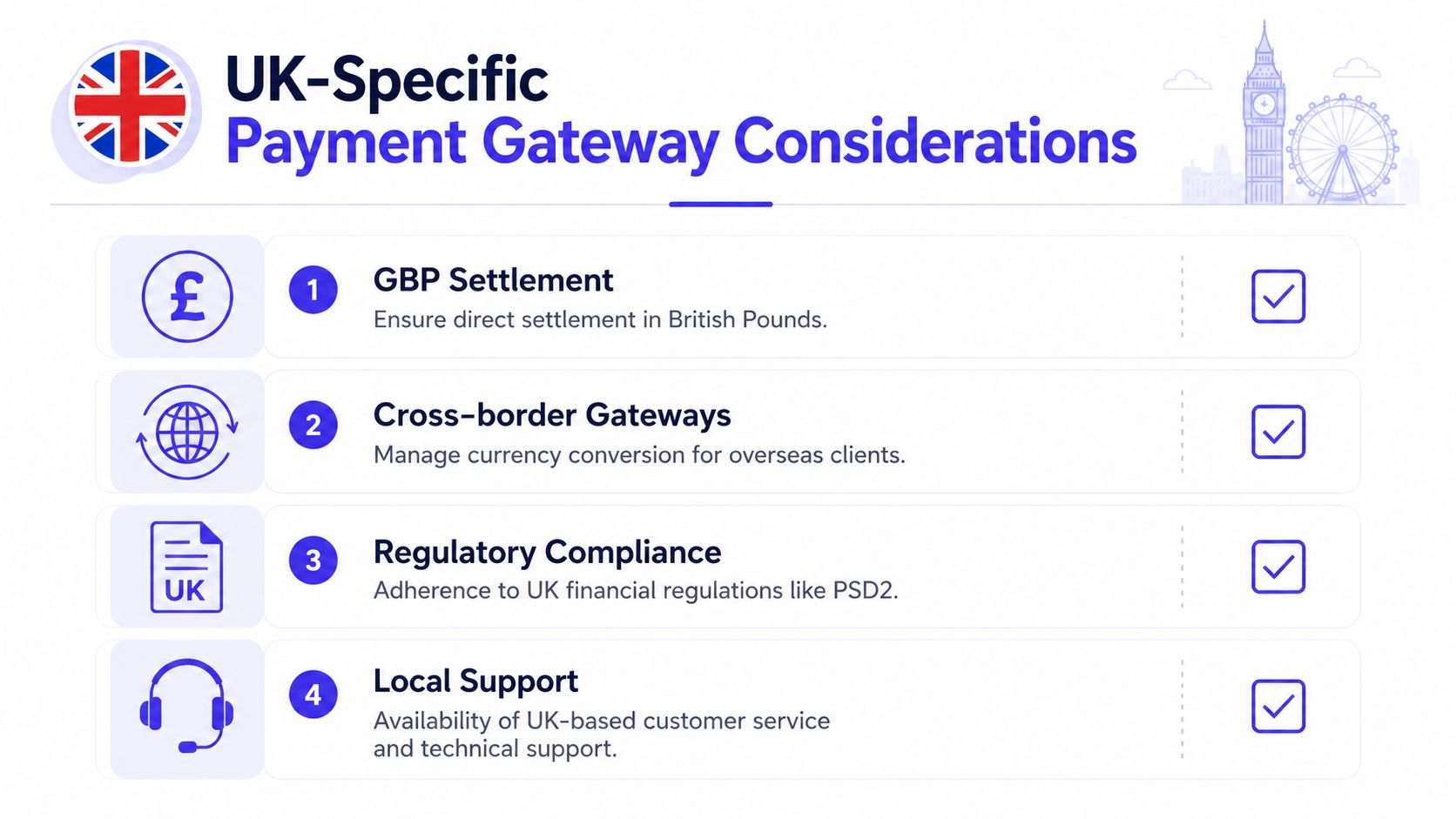
The UK adds a few practical requirements that global payment pages often skate past. If you bill in pounds, invoice with VAT, and work with local clients, the gateway has to behave like part of your operating system, not just a generic checkout widget.
GBP, foreign clients, and cash flow
For domestic work, GBP settlement is the cleanest path because it keeps invoicing and bank reconciliation simple. If you serve overseas clients, an international-capable gateway can handle currency conversion alongside GBP transactions, which keeps the customer experience smoother and avoids awkward manual calculations later. Salesforce's payment gateway guidance notes that gateways are expected to encrypt and route data in real time, typically returning an approve or decline response within a few seconds, while maintaining PCI-DSS controls.
That speed matters for cash flow planning too. Even when the payment is approved quickly, you still need to plan for the later settlement into your bank account, and that lag affects how confidently you can tie down payroll, supplier payments, and job scheduling.
VAT and data handling
If your invoices are VAT-ready, the payment receipt has to reconcile cleanly with the VAT line on the invoice. That's not just bookkeeping neatness. It's how you avoid mismatches between what the client paid and what your records show as taxable revenue.
You also need to care about how the gateway and its connected processors handle personal and cardholder data under UK GDPR and the Data Protection Act 2018. For most service businesses, the right gateway reduces exposure because it keeps card details out of your own systems, but the data flow still matters if you're choosing between providers.
Business analytics only helps if the payment data is reliable first, so the gateway you choose should make reporting and reconciliation feel local, readable, and easy to audit. If support teams are overseas and bank links are awkward, that friction shows up later in admin, not just at checkout.
Where Payment Gateways Fit in a Service Business Workflow
A gateway only becomes useful when it's part of the actual way you work. For a UK service business, that usually means either invoice collection or booking deposits, and both need the payment step to sit neatly inside the customer journey.
Invoice collection in a consultancy
A consultant sends a quote, the client approves it, and the approved quote turns into an invoice with a payment link. The customer opens the invoice page, pays by card or wallet, and the gateway captures the payment on that public page. The invoice status updates automatically, which saves the consultant from checking inboxes and bank feeds all afternoon.
That workflow matters because it shortens the path from approval to payment. It also makes the business look more organised, since the client sees one clean flow instead of a PDF invoice plus a separate message asking them to transfer funds.
Booking deposits in a salon or trades business
A salon takes a deposit when the appointment is booked, which reduces no-shows and gives the customer a clear commitment step. The gateway authorises the card payment at booking, then that deposit can be reconciled against the final invoice at the appointment. For a trades business, the same approach can work for a callout fee or a materials deposit.
Connect that payment step to your sales process properly and the whole workflow becomes easier to manage. The payment isn't a separate chore anymore. It sits inside the quote, booking, or invoice flow where it belongs.
Short version: the best gateway is the one your customer barely notices and your team never has to chase twice.
The operational benefit is obvious. Fewer chasing emails. Faster cash. Clearer reporting. Less room for “I thought you'd already paid” conversations.
Choosing and Setting Up the Right Gateway for Your Business
The safest choice is usually the simplest one that fits your actual workflow. Start with four checks. It should support GBP settlement to a UK bank account, it should have PCI-DSS and 3-D Secure in place, it should connect cleanly to your invoicing or booking flow, and its fees should make sense per paid invoice rather than on paper alone.
A short decision checklist
- Confirm the currency flow: make sure the gateway can settle in pounds if your business is UK-first.
- Check the security defaults: PCI-DSS and 3-D Secure should be part of the setup, not an optional add-on you'll “look at later”.
- Test the workflow fit: invoice pages, booking deposits, and quote approvals should link to payments without awkward handoffs.
- Review the full cost: include fixed fees, transaction fees, and the admin time you'll spend reconciling payments.
If you're still comparing options, this guide to accepting online payments is a useful next read because it forces the setup question, not just the definition question. The goal is to choose a gateway that supports the way your business already works.
In modern setups, tokenisation can replace raw card numbers with tokens so sensitive card data doesn't sit on the business server, which is why the gateway matters so much in the first place. It's the bridge between the customer, the merchant, the processor, and the bank networks, not the place where the money itself is moved.
If you want one system for quoting, invoicing, and online payment collection, AetherCloud pulls those steps into a single workflow for UK service businesses. See how AetherCloud can help you turn approved quotes into invoices with secure online payments, then keep your customer records and cash flow in one place.