

Running a service business in the UK is demanding. Between managing jobs, chasing invoices, and keeping clients happy, it's easy to feel like you're reacting, not planning. Business reports change that. They show what you've sold, what you've collected, which clients are drifting, and where admin is slowing you down.
That matters more than most owners realise. UK small businesses waste an average of 33 hours per month on admin, which is exactly why reporting has to come from the systems you already use, not from another spreadsheet you update late at night. For UK service firms, the pressure is even sharper because late payment, scheduling gaps, and scattered client records all hit cash flow at the same time.
These business reports examples are built for that reality. They aren't corporate filler. They're practical report types that help sole traders, agencies, consultants, and tradespeople make better decisions faster. The best setup is one where your bookings, CRM, quotes, invoices, payments, and dashboard all feed the same reporting layer automatically. That's where AetherCloud stands out. It gives UK service businesses one place to run the work and see the numbers behind it, without stitching together disconnected apps.
Table of Contents
- 1. Sales Report
- 2. Profit & Loss Statement
- 3. Cash Flow Report
- 4. Invoice Ageing Report
- 5. VAT Return
- 6. Client Activity Report
- 7. AppointmentBooking Report
- 8. Project Status Report
- 8 Business Report Types Comparison
- From Reports to Revenue Your Next Step
1. Sales Report
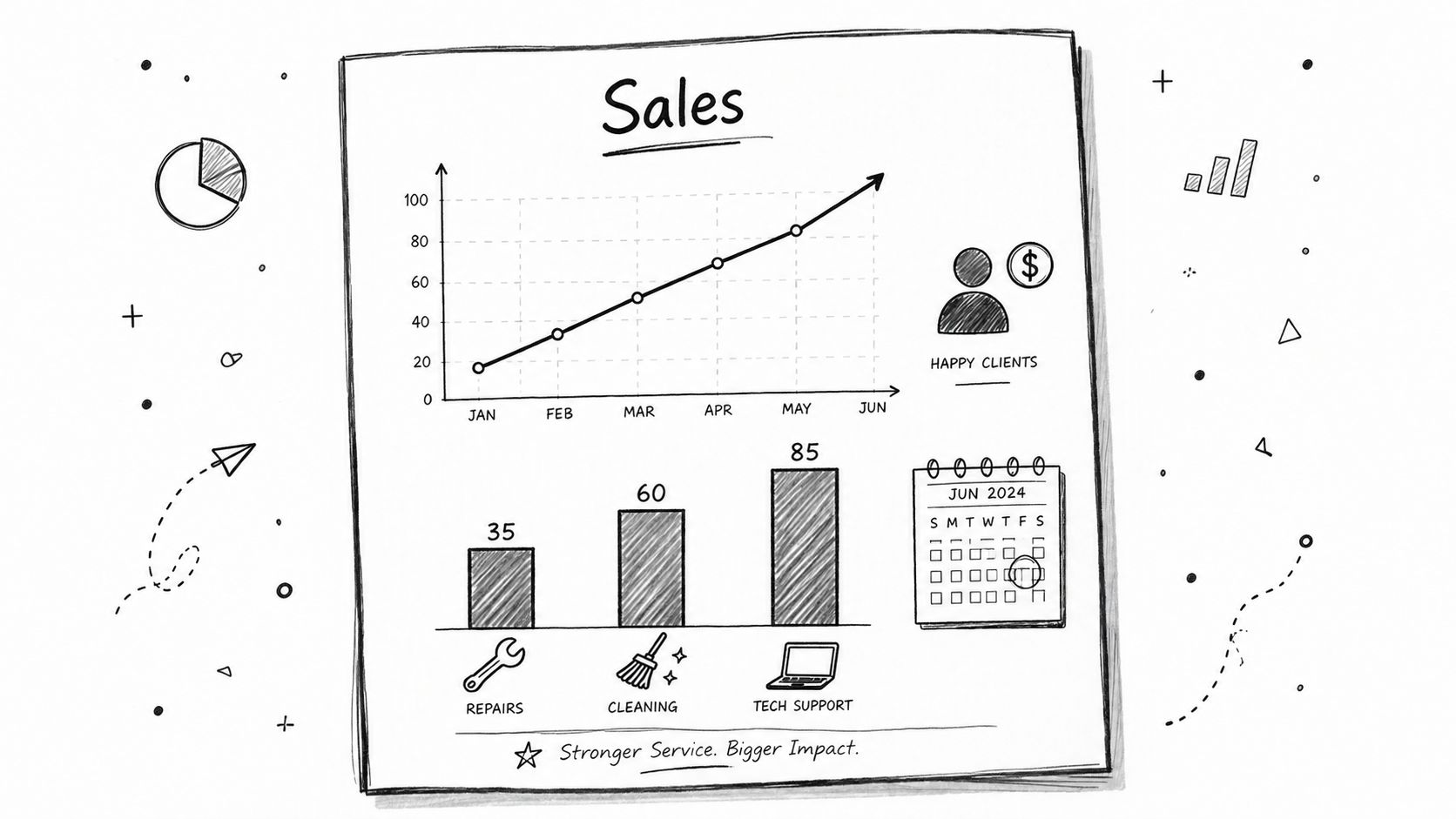
It is Friday afternoon. You've finished the work, sent the invoices, answered client messages, and now you want one clear answer. What sold this week?
That is the job of a sales report. For a UK service business, it shows what you've billed in a given period, which services brought the revenue in, and whether the month is being carried by repeat clients, urgent one-off jobs, or a handful of large accounts. If you run a plumbing firm, marketing agency, cleaning business, consultancy, or solo trade, this report gives you a quick read on demand before small issues turn into bigger ones.
A useful sales report also helps with decisions that come up all the time. Should you push a profitable service harder, review pricing, or stop spending time on work that keeps you busy but adds little revenue? You cannot answer that from a bank balance alone.
What a useful sales report should show
A sales report should break income down in ways that match how you run the business. Monthly totals are too blunt on their own. You need enough detail to spot trends without creating more admin for yourself.
What works well
- Revenue by period: Daily, weekly, monthly, and quarterly views show busy spells, slow periods, and seasonal patterns.
- Revenue by service: You can see which jobs bring in the most money and which ones fill the diary without adding much value.
- Revenue by client: This highlights repeat business, high-value accounts, and overreliance on one customer.
- Revenue by staff member or subcontractor: Useful if you want to compare output, utilisation, or job mix across the team.
Practical rule: A sales report shows billed revenue, not cash received.
That trade-off matters. A strong sales month can still leave you short if clients pay late or invoices are sitting unpaid. Sales reports are still worth checking first because they show where demand is coming from and whether your pipeline is turning into real work. Paired with a report on your cycle of sales, they give you a cleaner view from enquiry to quote to invoice.
Many owners still build this report by hand from calendars, invoices, card payments, and spreadsheets. That usually works for a while, then breaks once the business gets busy. Figures stop matching, categories drift, and month-end becomes another admin job.
AetherCloud cuts that out. It pulls quotes, bookings, invoices, and payments into one place, then generates the sales report for you. If you want a clearer view of how these figures fit into your wider accounts, this guide to the format of a financial statement is a useful next read. The main benefit is simple. You spend less time assembling reports and more time using them to price better, follow up faster, and protect revenue.
2. Profit & Loss Statement
Turnover can flatter a business. Profit tells the truth. A profit and loss statement shows whether the work you're doing leaves money after materials, software, subcontractors, wages, rent, insurance, and other costs are accounted for.
For many service businesses, a blind spot emerges: a busy month feels successful, but once the costs are pulled in, the margin may be far thinner than expected. That matters even more in a climate where over 31% of UK trading businesses reported that economic uncertainty negatively impacted their turnover as of January 2026. If turnover is under pressure, owners need a clean view of profit, not just activity.
What works and what often goes wrong
A strong P&L groups income and expenses in a way that helps you act. You should be able to see direct delivery costs separately from overhead, then compare periods without digging through bank exports line by line.
What works is consistency. If you code costs differently every month, the report loses value fast. What doesn't work is relying on memory at year end and trying to rebuild expenses from old receipts and card statements.
A P&L is where "we're busy" either becomes "we're profitable" or falls apart.
Useful sections usually include sales income, direct job costs, overheads, and tax-related categories that your accountant can reconcile properly. If you're reviewing your own figures before sending them on, it helps to understand the basic format of a financial statement so you can spot missing categories early.
AetherCloud isn't trying to be a bulky enterprise finance suite. Its value is simpler than that. Because quotes, invoices, payments, and core client activity live together, your reporting starts from cleaner operational data. That reduces the usual mess where revenue sits in one app, customer notes in another, and payment status in a third.
3. Cash Flow Report
If there's one report that keeps small service firms out of trouble, it's cash flow. Plenty of businesses look fine on paper while struggling to pay suppliers, wages, or VAT because the money hasn't landed yet. A cash flow report shows the timing, not just the totals.
For UK service businesses, this is especially important because late payments are still a live problem. Research on small business conditions in Britain found that 40% of UK small firms reported being affected by late payments in 2023. That's why generic business reports examples often miss the mark. They show revenue summaries, but they don't connect quote dates, invoice dates, and actual payment delays in a way that's useful when you're trying to protect cash.
The report that stops nasty surprises
A useful cash flow report starts with your opening balance, then lists cash in, cash out, and what's scheduled next. It should also show expected receipts against due dates, so you can see when a healthy-looking month still creates a short-term squeeze.
What to include
- Payment timing: The invoice date matters less than when the customer pays.
- Known outgoings: Wages, software, fuel, rent, materials, tax, and recurring supplier payments need clear timing.
- Forward view: Even a simple short-term forecast is better than reacting once the account is already tight.
The weakness of this report is that forecasts depend on assumptions. If a big invoice slips, your outlook changes immediately. That's why cash flow reporting works best when your invoicing and payment collection are tied directly to the same system used to run the work. In AetherCloud, approved quotes become invoices and online payments feed back into the same operational view, so your report stays closer to reality.
4. Invoice Ageing Report
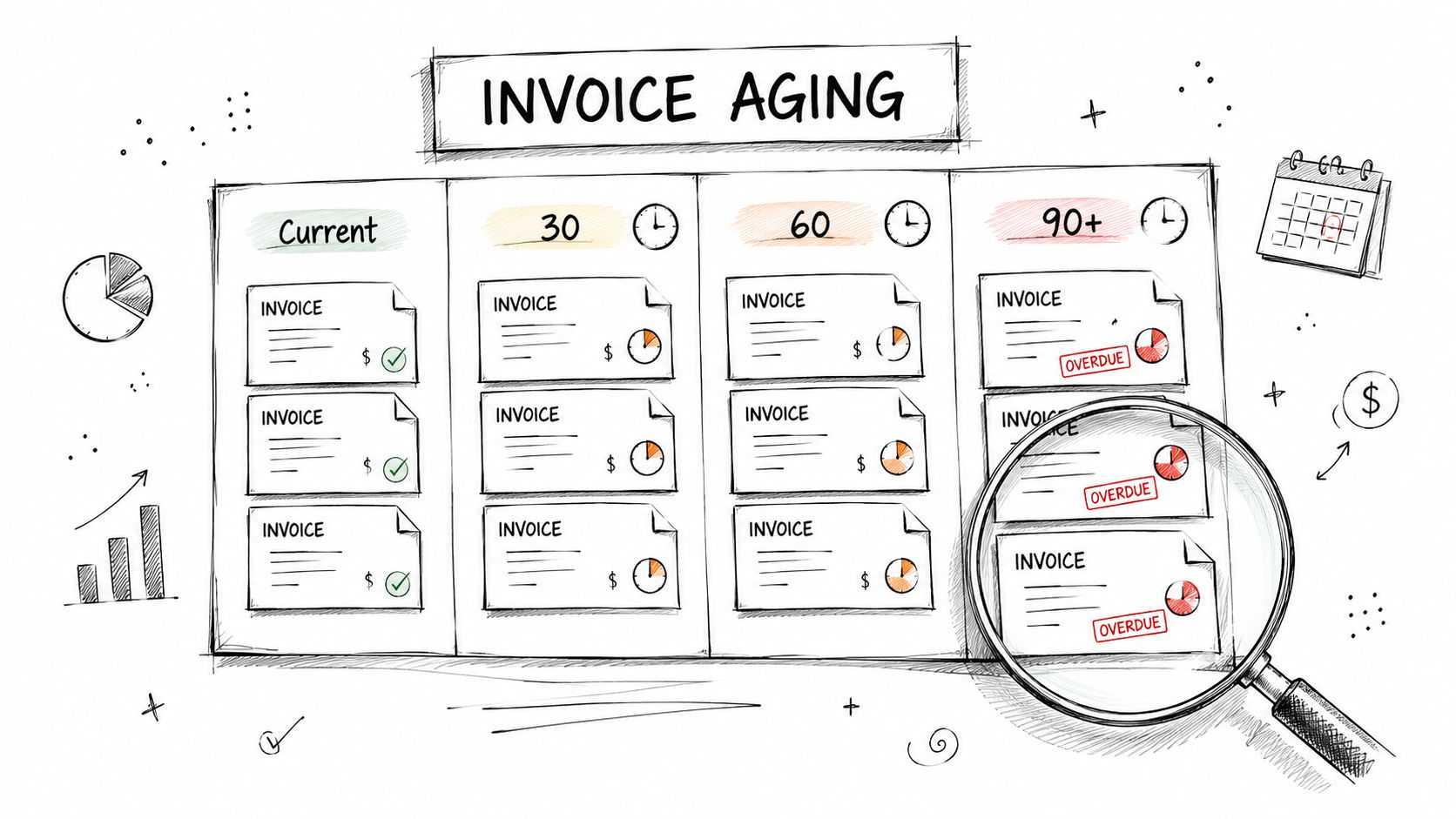
An invoice ageing report is one of the most practical business reports examples because it tells you exactly who owes you money and how late they are. No interpretation needed. You can see current invoices, overdue invoices, and the accounts that are drifting into real risk.
For service businesses, that's operational, not just financial. A client who pays late every time doesn't just affect one invoice. They affect your scheduling decisions, your supplier planning, and how much trust you put into future work.
What to act on first
The best ageing reports separate invoices into clear bands, include the client name, invoice date, due date, amount outstanding, and current status. If you're handling this manually, the report gets out of date fast. If it's linked to live invoice status, it becomes one of the easiest reports to act on daily.
A 2024 study covering UK trades and home service providers found that businesses moving from fragmented tools to unified systems reduced operational duplication by 47% and cut quote-to-approval turnaround from 3.2 days to 1.1 days. The same study found that online invoice payment links accelerated cash flow by an average of 9.3 days. That's exactly why invoice ageing reports are more useful when paired with payment links rather than manual bank chasing.
What makes this report effective
- Oldest debt first: Prioritise the invoices that have the highest risk of turning into bad debt.
- Repeat offenders: Spot clients who need deposits, tighter terms, or staged billing.
- Collection workflow: The report should lead directly to action, not sit as a passive list.
If you're still emailing PDFs and waiting for bank transfers, collection drags. If you're using online payment collection for invoices, the follow-up path is much shorter. AetherCloud keeps invoices, statuses, and payment pages connected, which makes this report far easier to use in real time.
5. VAT Return
A VAT return isn't glamorous, but it's one of the reports that can cause the most pain if your records are messy. For VAT-registered service businesses, it has to reconcile with your sales and purchase records, and it has to be accurate. If your invoices, expenses, and payment records sit in different places, this job becomes harder than it needs to be.
The practical value of a VAT return goes beyond compliance. It forces discipline. You can quickly see whether your invoicing is complete, whether your purchase records are tidy, and whether your filing process depends too heavily on last-minute corrections from your accountant.
Why clean records matter more now
UK small businesses also need to prepare for Making Tax Digital and the DMCC Act coming into force in 2026. That makes digital record-keeping and cleaner consumer transaction handling more important, not less. A report that used to be an end-of-quarter scramble now sits inside a broader compliance picture.
Messy operational data always shows up in tax reporting eventually.
The strongest VAT workflow starts with clean invoice creation, consistent categorisation, and a reliable audit trail. That's where all-in-one systems earn their place. If your quotes become invoices, your invoices link to payments, and your records stay in one place, the return is easier to reconcile. If you're copying figures between tools, mistakes can arise subtly.
AetherCloud is built for UK businesses with GBP billing and VAT-ready invoicing, which is exactly the sort of setup that keeps VAT reporting manageable. It won't replace professional tax advice, but it does remove a lot of the avoidable operational mess that makes VAT submissions stressful.
6. Client Activity Report
A client activity report tells you who is active, who has gone quiet, who keeps approving quotes, and who takes up time without converting. That makes it one of the most commercially useful reports for small service firms, especially those that depend on repeat work and referrals.
This report is often missing because the data is scattered. Appointments might sit in a calendar, quotes in a document tool, invoices in billing software, and follow-ups in someone's inbox. Once that happens, "relationship management" becomes guesswork.
The difference between a contact list and a real client report
A proper client activity report should combine contact details with service history, quote history, invoice history, and recent engagement. That's how you separate a high-value repeat client from someone who asked for a price six months ago and disappeared.
The UKRI SBRI evaluation found that service businesses adopting public microsites for appointments, quotes, and payments saw conversion rates increase by 34% compared with email-only workflows. The report also highlighted the value of UK-specific presentation such as VAT display, local terminology, and pricing formats. For client activity reporting, that's important because cleaner client interactions create cleaner records.
What this report helps you do
- Spot dormant accounts: Good for reactivation campaigns and check-in calls.
- Prioritise loyal clients: Repeat customers usually deserve faster response and smoother booking.
- Track quote behaviour: If a client asks for multiple quotes but rarely approves, you can adjust how much time you invest.
A simple CRM list won't do this properly. You need linked activity. That's where customer engagement strategies become much easier to apply when your CRM, quotes, bookings, and invoices all feed one timeline. On AetherCloud, that joined-up view is the point.
7. AppointmentBooking Report
For appointment-led businesses, your diary is your revenue engine. A booking report shows how that engine is performing. It tells you when demand peaks, which services fill the calendar fastest, where cancellations are hurting, and whether team capacity matches actual demand.
Operational efficiency isn't just about earning more; it also depends on tracking metrics such as average payment delay and time to deliver a product or service. A booking report gives you part of that picture by showing how your time is being used before the invoice is even sent.
Where scheduling data becomes business insight
The basic version of this report lists appointments, dates, times, assigned staff, service type, and status. The better version adds cancellations, no-shows, booking lead time, and repeat patterns by client or service.
What works is using the report to make practical decisions. You might tighten cancellation rules for peak slots, reserve certain times for high-value services, or adjust staffing on days that consistently overload the schedule. What doesn't work is treating the diary as a passive record with no review process.
A full calendar isn't always a healthy calendar. It can hide underpriced work, awkward travel gaps, and frequent reschedules.
AetherCloud's scheduling and appointment management tools are useful here because they connect bookings with the customer record, the quote, and the invoice path. That means your booking report doesn't sit in isolation. It links directly to the commercial outcome, which is what most standalone calendar tools fail to do.
8. Project Status Report
A project feels healthy until the client asks for an update and the team gives three different answers. One person is tracking delivery in a spreadsheet, another in email, and the latest approval is buried in a message thread. That is usually when delays, missed scope changes, and awkward invoice conversations start.
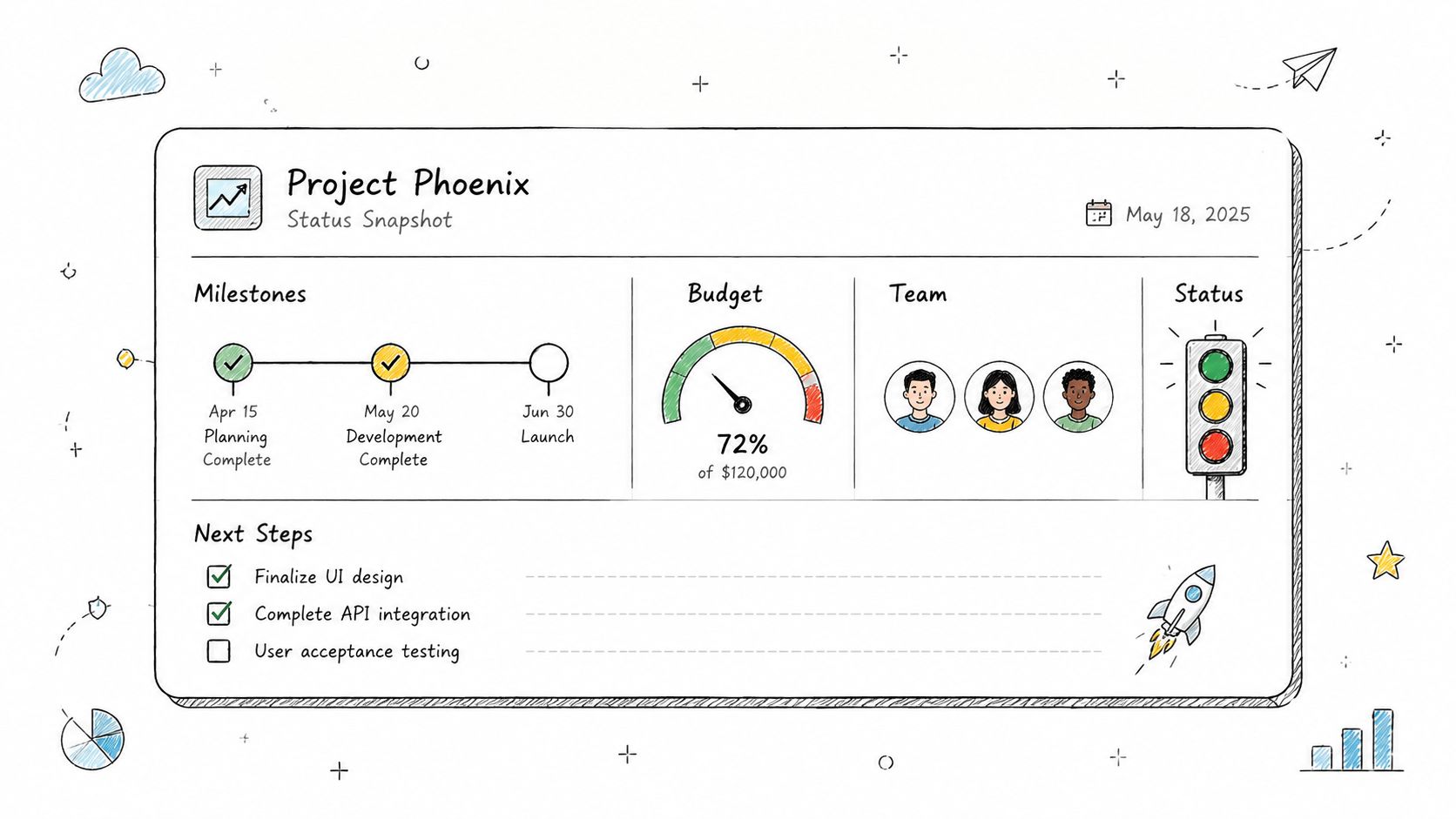
A project status report gives you one current view of what has been delivered, what is waiting, what is at risk, and what happens next. For UK service businesses handling phased work, that matters because progress and billing are often tied together. If the report is vague, it becomes harder to justify a stage invoice, explain a delay, or spot margin drift early.
What a useful status report should show
Clients usually want clarity, not a flashy dashboard. They want to know whether the work is on track, whether they owe you a decision, and whether the next deadline still stands. Internally, your team needs the same report to check effort against budget and confirm that the next payment point is supported by completed work.
The strongest version stays short and current. It usually covers:
- Milestone progress: What is complete, in progress, delayed, or waiting for approval.
- Budget or time used: Enough detail to catch overruns before they wipe out profit.
- Blocked items and risks: Issues that need a client response, supplier input, or internal action.
- Next actions with owners: Clear accountability, dates, and no ambiguity about who does what.
This is also where service firms see the trade-off between detail and admin. A polished weekly report looks professional, but if your team spends an hour assembling it from disconnected tools, the process starts to work against you. Standardising delivery steps with time and motion templates for repeatable service work helps, especially if you run similar projects each month.
AetherCloud keeps the report practical because project updates, client records, quotes, invoices, and payment milestones sit in one place. That means the status report can be generated from live job activity instead of copied together at the end of the week. For a sole trader or small service team, that cuts admin, reduces version confusion, and makes it much easier to show a client exactly where the job stands.
8 Business Report Types Comparison
| Report | Implementation Complexity 🔄 | Resource Requirements ⚡ | Expected Outcomes 📊⭐ | Ideal Use Cases 💡 | Key Advantages ⭐ |
|---|---|---|---|---|---|
| Sales Report | Low, straightforward to generate (automiced from invoices) 🔄 | Basic sales/invoice data; minimal setup ⚡ | Revenue trends and top services; service-level revenue insight ⭐⭐⭐ 📊 | Monitor sales performance, pricing decisions, identify top clients 💡 | Fast to produce; highlights demand and growth opportunities ⭐ |
| Profit & Loss (P&L) Statement | Medium–High, needs full expense tracking and categorisation 🔄🔄 | Complete revenue + expense records; accounting software or accountant ⚡ | True profitability and cost breakdown; net profit visibility ⭐⭐⭐ 📊 | Tax compliance, investor/loan requests, strategic pricing 💡 | Shows net profit and expense drivers; supports compliance and planning ⭐ |
| Cash Flow Report | Medium, requires payment timing and forecasting 🔄 | Detailed payment timing, bank data, regular updates; forecasting tools ⚡ | Actual cash position and short-term liquidity forecasts ⭐⭐⭐ 📊 | Working capital management, payment planning, avoiding overdraft 💡 | Prevents cash shortages; reveals timing gaps and slow payers ⭐ |
| Invoice Ageing Report | Low–Medium, simple logic but needs up-to-date AR status 🔄 | Up-to-date invoice/payment status; AR tracking or accounting tool ⚡ | Prioritised collections and DSO visibility; ageing bands 📊⭐⭐ | Chasing overdue payments, credit control, reducing bad debt 💡 | Actionable collection priorities; identifies high-risk accounts ⭐ |
| VAT Return | Medium–High, compliance-focused with precise reconciliation 🔄🔄 | VAT-tagged invoices/receipts, reconciliation tools, record retention ⚡ | HMRC-compliant VAT submission; net VAT liability clarity ⭐⭐ 📊 | VAT-registered businesses; quarterly/monthly statutory filing 💡 | Enables input VAT reclaim; reduces risk of penalties and audits ⭐ |
| Client Activity Report | Medium, needs CRM integration and consistent logging 🔄 | CRM or contact logs, appointment/invoice history; regular updates ⚡ | Client engagement patterns and retention opportunities ⭐⭐ 📊 | Re-engagement campaigns, upselling, loyalty and segmentation 💡 | Identifies high-value and dormant clients; guides retention spend ⭐ |
| Appointment / Booking Report | Low–Medium, depends on scheduling data quality 🔄 | Scheduling system data, staff inputs, cancellation tracking ⚡ | Capacity utilisation, peak times, no-show rates ⭐⭐ 📊 | Capacity planning, dynamic pricing, reducing no-shows 💡 | Optimises staffing and pricing; improves utilisation and revenue ⭐ |
| Project Status Report | Medium–High, aggregates timeline, budget and risks from multiple sources 🔄🔄 | Project tracking tools, time/budget data, frequent updates and inputs ⚡ | Project health snapshot: timeline, budget variance, risks ⭐⭐ 📊 | Client projects, milestone billing, stakeholder reporting 💡 | Improves transparency, early risk detection and budget control ⭐ |
From Reports to Revenue Your Next Step
Knowing which reports matter is useful. Generating them without adding more admin is what transforms the business. That's the core gap with most business reports examples online. They show neat templates, but they don't solve the daily problem of disconnected systems, missing records, and hours lost pulling together figures from multiple apps.
For UK service businesses, the stakes are practical. You need to see sales clearly, understand real profitability, protect cash flow, chase overdue invoices properly, keep VAT records straight, spot dormant clients, fill your calendar sensibly, and stay on top of active projects. None of that works well when your scheduling sits in one place, your CRM in another, your quotes in email, and your invoices in separate finance software.
AetherCloud is designed to remove that fragmentation. It combines appointment scheduling, contact management, quoting, invoicing, online payments, digital business cards, and analytics in one straightforward platform built for UK businesses. That means the data behind your reports is created as part of the work itself. A quote is sent for approval. It becomes an invoice. The customer pays online. The status updates automatically. The report doesn't need rebuilding by hand afterward.
That's more than a convenience. It cuts rework, reduces missed follow-ups, and gives you a cleaner view of the business at any point in the month. If you're dealing with late payments, slow approvals, patchy client records, or an overloaded admin routine, a unified system is usually the simplest fix. It also helps you look more professional to clients, because bookings, approvals, invoices, and payment pages follow a consistent process.
There's a second benefit that often gets overlooked. Better reporting makes better decisions feel less risky. You can see which services deserve more attention, which clients need firmer terms, where your calendar is leaking revenue, and whether a project is staying commercially healthy. That's the difference between running the business by instinct and running it with evidence.
AetherCloud fits that need well because it isn't trying to be everything for everyone. It's focused on UK service businesses that want one place to manage operations and see meaningful performance data without wrestling with a complex software stack. If you want reporting that comes from real day-to-day work rather than another manual spreadsheet exercise, it's the practical next step.
If you want cleaner reporting without juggling separate tools, try AetherCloud and see how it simplifies scheduling, CRM, quotes, invoices, payments, and analytics in one place.